Getting started
Welcome to Semurai
Semurai is an AI growth workspace for SEO, content and ecommerce. You give it one goal; eight AI agents plan, research, write, design and measure, and nothing goes live until you approve it.
 SemurAgent lead
How work flows
You give a goal
Describe what you want in your own words, for example more traffic to a product category or a month of posts for a launch.
Semur plans the work
Semur, the agent lead, splits the goal into up to six assignments and runs up to three specialists at once. Goals run as 7-day campaigns, and you see the plan before anything starts.
You approve
Specialists never publish, schedule or delete on their own. Everything that would change your website or channels waits for you on one approval card.
Work goes live and gets measured
Approved articles, product changes and posts go to your connected website, store and social accounts, and the results come back to Semurai.
Meet the agents
Each tool in Semurai belongs to an agent. They all share your Brand Kit, so they write and design in your voice.
| Agent | Role | Where you work with them |
|---|---|---|
| Semur | Agent lead | Campaigns, opportunities and approvals |
| Keyres | Keyword research | Keyword research and topic clusters |
| Tenko | SEO content | SEO editor with Content Score, and documents |
| Hime | Health Score | SEO audit, repair plans and scheduled audits |
| Spynobi | Competitors and analytics | Competitor analysis, analytics and Search Console |
| Rankmaru | Rank tracking | Rank tracker: daily positions on desktop or mobile |
| Somi | Social media | Social posts and the calendar |
| Dezaina | Brand and creative | Brand Kit, Canvas and Creative Studio |
Besides working with you in the chat, each agent can take on duties it handles on its own, for example:
- Semur prepares the Weekly plan on Mondays, a Monthly report and a Daily digest of what the agents did.
- Keyres refreshes keyword opportunities every week, builds a Monthly content plan and spots keywords close to the top 3 in Search Console.
- Tenko outlines the next article of your content plan, proposes new titles and meta descriptions for pages with a low CTR and drafts copy for new products.
- Hime reviews every new Health Score audit, prepares a fix pack for WordPress and checks each new page.
- Spynobi writes a Monthly visibility report, follows competitor topics and checks who overtook you after a ranking drop.
- Rankmaru raises an alarm when important keywords drop, sends a Weekly ranking report and suggests how to hold ranking gains.
- Somi fills gaps in your post calendar, turns new articles into posts and prepares posts or a campaign proposal for upcoming marketing occasions.
- Dezaina prepares graphics for scheduled posts, keeps the media library tidy and checks your brand consistency every month.
Agents also work in the background
You do not have to start every task yourself. A duty runs on a schedule, such as every Monday at 8:00, or after a change in your data, such as a ranking drop, a Search Console signal or a new blog article. Nothing turns on by itself: duties run only after you add them in an agent’s settings or turn on a package.
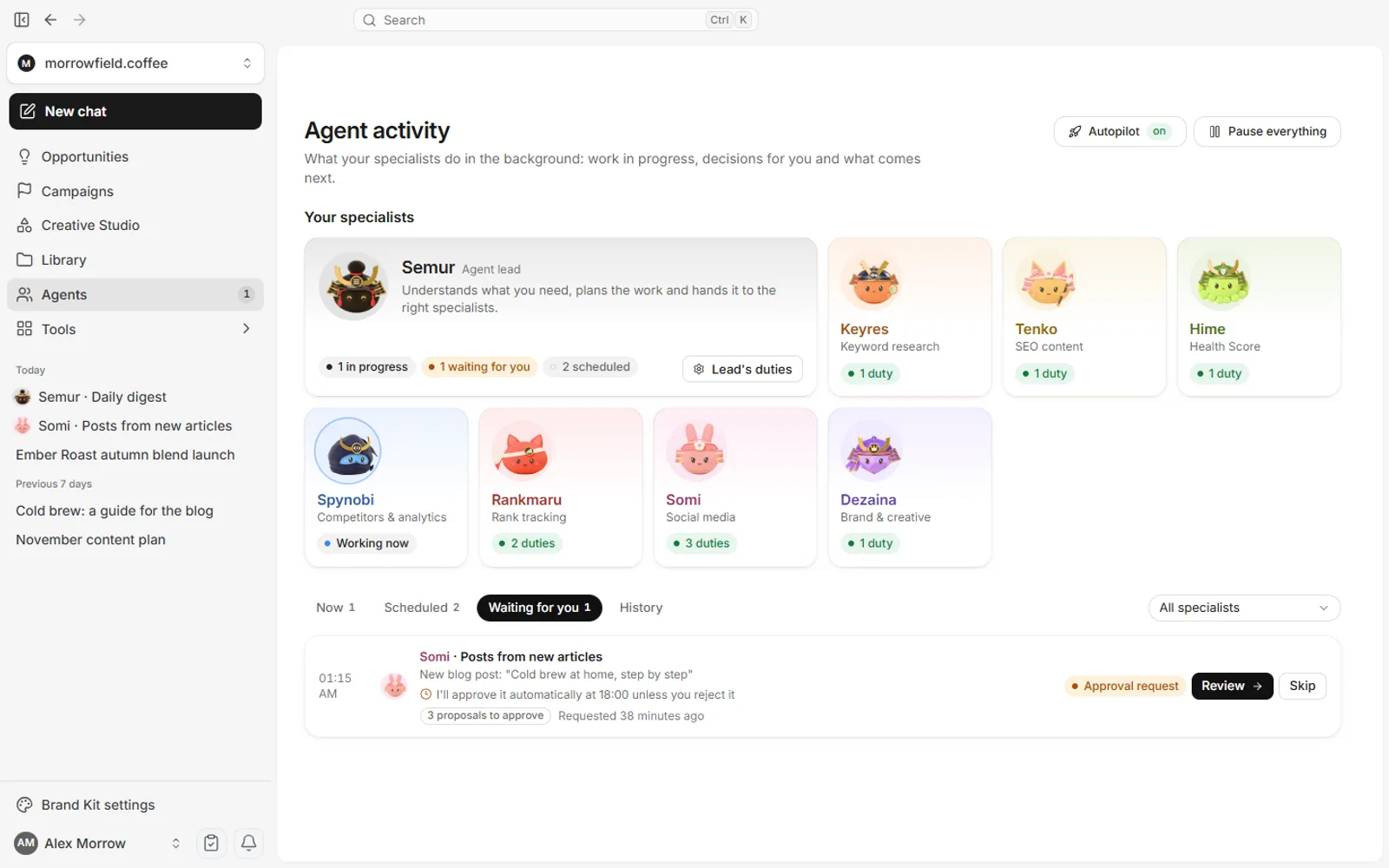
- Agent activity shows what the agents are doing now, what is scheduled, what waits for you and the history with links to results. You can run, pause or stop any duty there.
- Approvals stay with you. A background run prepares analyses, drafts and proposals. Anything that would change your website, store or channels waits on an approval card.
- The autopilot is off by default. When you turn it on in a project, the agents approve the actions you chose themselves after a veto window (12 hours by default) unless you reject them, within weekly limits.
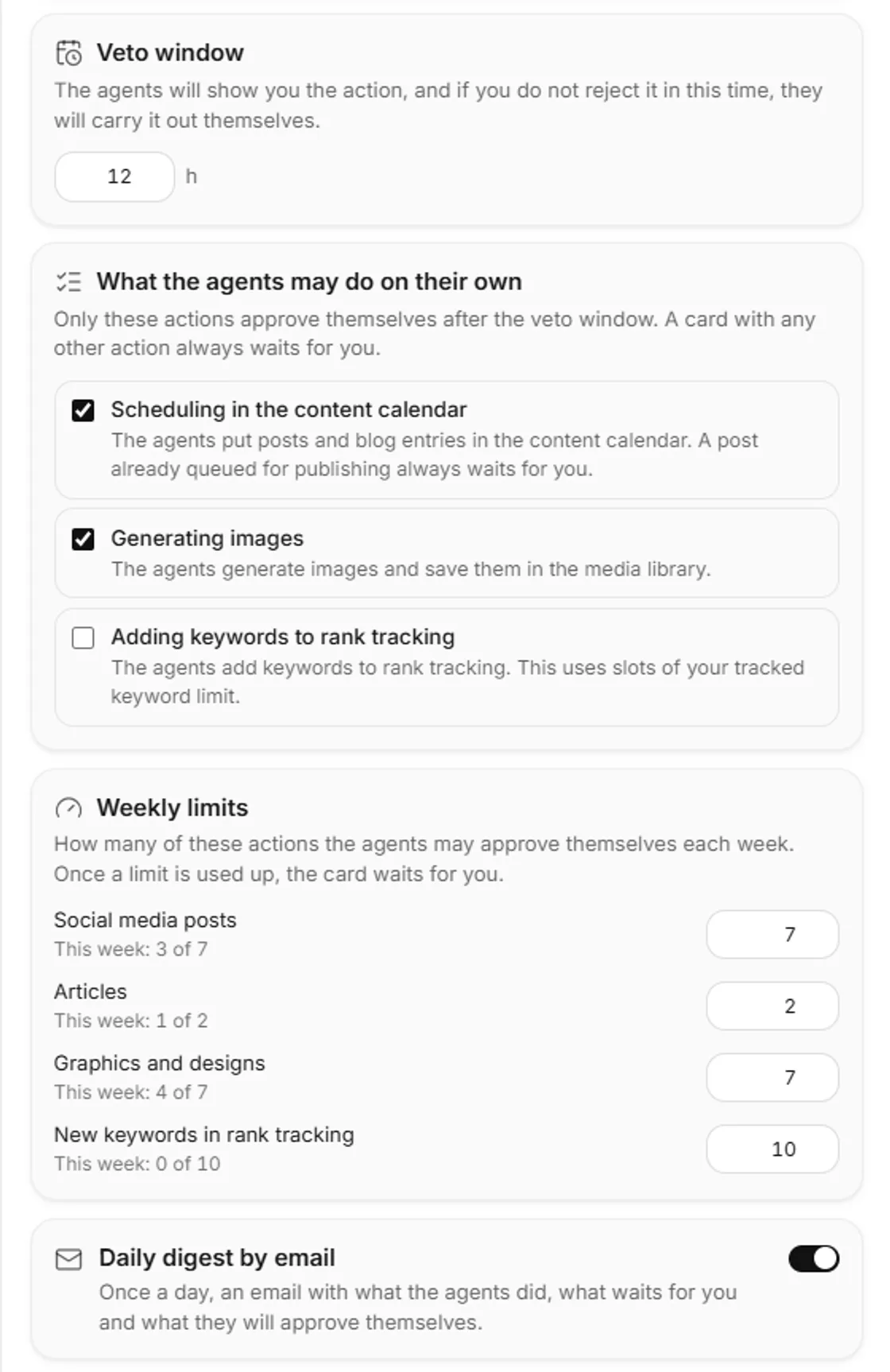
- AI agents and autopilotDuties, Agent activity and the autopilot step by step.
What you can connect
- Your website or store: the WordPress plugin (including WooCommerce), the Shoper app and the PrestaShop module.
- Social accounts: Facebook Pages, Instagram professional accounts and LinkedIn, to publish, schedule and import metrics. X works for drafts.
- Google Search Console: clicks, impressions, CTR, queries and pages for your site.
Where to start
- Set up in about 3 minutesFrom your website to a Brand Kit and a first plan.
- Your first 7-day campaignGive a goal, review the plan, approve.
- Connect your website or storeWordPress, Shoper or PrestaShop.
- Read your resultsWhat worked, and what to do next.
- Chat with SemurGoals, plans and approvals in one conversation.
- Creative StudioGraphics, carousels and pages designed by Dezaina.

Languages and plans
The app and the agents work in 14 languages; sign-up and billing are in English or Polish. There is a free plan with monthly limits and no card required; every paid plan includes every agent and tool, and the High mode of Creative Studio needs the Growth plan or higher. See pricing.







