AI content creation platform
The AI content creation platform
from brief to published.
Semurai is an AI content creation platform run by a team of AI agents. Give Semur one brief: Tenko writes the SEO article and the store descriptions, Somi drafts the social posts and Dezaina designs the graphics. You choose what runs on one approval card, review the store descriptions as proposals, and you decide what goes live.
Free forever plan · No credit card





Definition
What is an AI content creation platform?
An AI content creation platform is software that plans, writes and designs marketing content with AI in one place, from the brief to the published piece. Instead of a single chat window, it joins the jobs a content stack splits up. In Semurai, a team of AI agents does each job, and you approve the result.
The same agents also work as an AI SEO agent for rankings and as AI marketing agents for campaigns. Here are the five jobs, and the AI content creation tools that usually do them in a do-it-yourself stack. For the craft itself, read our guide to AI content creation. Prefer to work in Claude or ChatGPT? The Semurai MCP server gives your AI assistant Semurai’s SEO data, drafts and content calendar.
- Writing: articles, posts, product copy and e-mail drafts. Usually a general assistant such as ChatGPT or Claude.
- SEO optimisation: keywords, topic clusters and a score while you write. Usually an optimiser such as Surfer.
- Design: graphics, carousels, ads and presentations in your brand’s style. Usually a design tool such as Canva.
- Publishing and scheduling: blog posts, store pages and social posts on a calendar. Usually a CMS plus a scheduler.
- Review and approval: a person checks the work before it goes live. Usually e-mail threads and comments in every tool.
See it work
One brief,
one approved package.
A run on a demo coffee brand: you brief Semur, Semur lays out the steps for Keyres, Tenko, Dezaina and Somi, and you approve the plan. Then Tenko writes the article and the product descriptions, Somi turns the article into posts and Dezaina designs the graphic; store descriptions arrive as proposals and the posts get proposed dates in the content calendar.
- Up to six assignments, three specialists at once
- One approval card: you pick what runs
- Publishing and store changes wait for your click
- Nine design formats, exported as PNG, JPEG, PDF, MP4 or GIF
RecordingTranscript
- Semur's plan for the Ember Roast launch waits for your OK
- Approve it, and Keyres starts with the keywords
- Tenko writes the article while Dezaina designs the graphic
- Somi writes 3 posts for Instagram and Facebook
- Scheduling the posts waits for your approval
- Each step shows its result: keywords, article, graphic, posts
Demo project: Morrowfield Coffee Co. (demo data). Keyres finds the keywords, Tenko writes the article while Dezaina designs the graphic, and Somi writes 3 posts; scheduling the posts waits for your approval.
The problem
Four tools, four tabs.
You are the handoff.
ChatGPT for drafts, Surfer for optimisation, Canva for graphics, a scheduler for posts. Each is good at its job. The copying and re-briefing between them is still yours.
- Today
Every piece starts with briefing each tool again from scratch.
With Semurai SemurAgent lead
You brief Semur once, and Semur hands each piece to the right specialist, up to three at once.
- Today
Topics come from a guess or a brainstorm in a chat window.
With Semurai KeyresKeyword research
Keyres checks search demand and builds topic clusters and a content plan first.
- Today
The draft travels from the chat to an optimiser to WordPress by copy and paste.
With Semurai TenkoSEO content
Tenko writes in the SEO editor, and the approved article goes to WordPress, Shoper or PrestaShop.
- Today
Every graphic is rebuilt by hand for each format and channel.
With Semurai DezainaBrand & creative
Dezaina designs from your Brand Kit in nine formats; you fine-tune in Canvas.
- Today
Posts are pasted into a scheduler one channel at a time.
With Semurai SomiSocial media
Somi writes posts for Facebook, Instagram and LinkedIn and proposes dates for them in the content calendar.
What you can create
Every content format,
in one workspace.
An AI content generator for marketing, where each format lives in a tool you can open and take over.
SEO articles
Tenko writes in the SEO editor with a Content Score. You can add an FAQ from People Also Ask with structured data, internal link suggestions and product cards from your store.
Explore the SEO editorSocial posts
Somi drafts posts and 7-day campaigns for Facebook, Instagram and LinkedIn and proposes dates for them in the content calendar. For X, Somi prepares drafts.
Content calendarGraphics, carousels and presentations
Dezaina designs in nine Creative Studio formats, from social graphics, carousels and ads to presentations and video. Fine-tune in Canvas, export PNG, JPEG, PDF, MP4 or GIF.
Explore CanvasProduct and category descriptions
Tenko proposes SEO copy for products and categories in Shoper, WooCommerce and PrestaShop. Your store changes only after you approve.
AI for ecommerceE-mail drafts
Tenko writes e-mails and Dezaina can design them. Semurai prepares the drafts, and you send them from your own tool.
Content plans and clusters
Keyres turns search demand into topic clusters and a content plan, so every piece starts with a keyword.
Keyword research
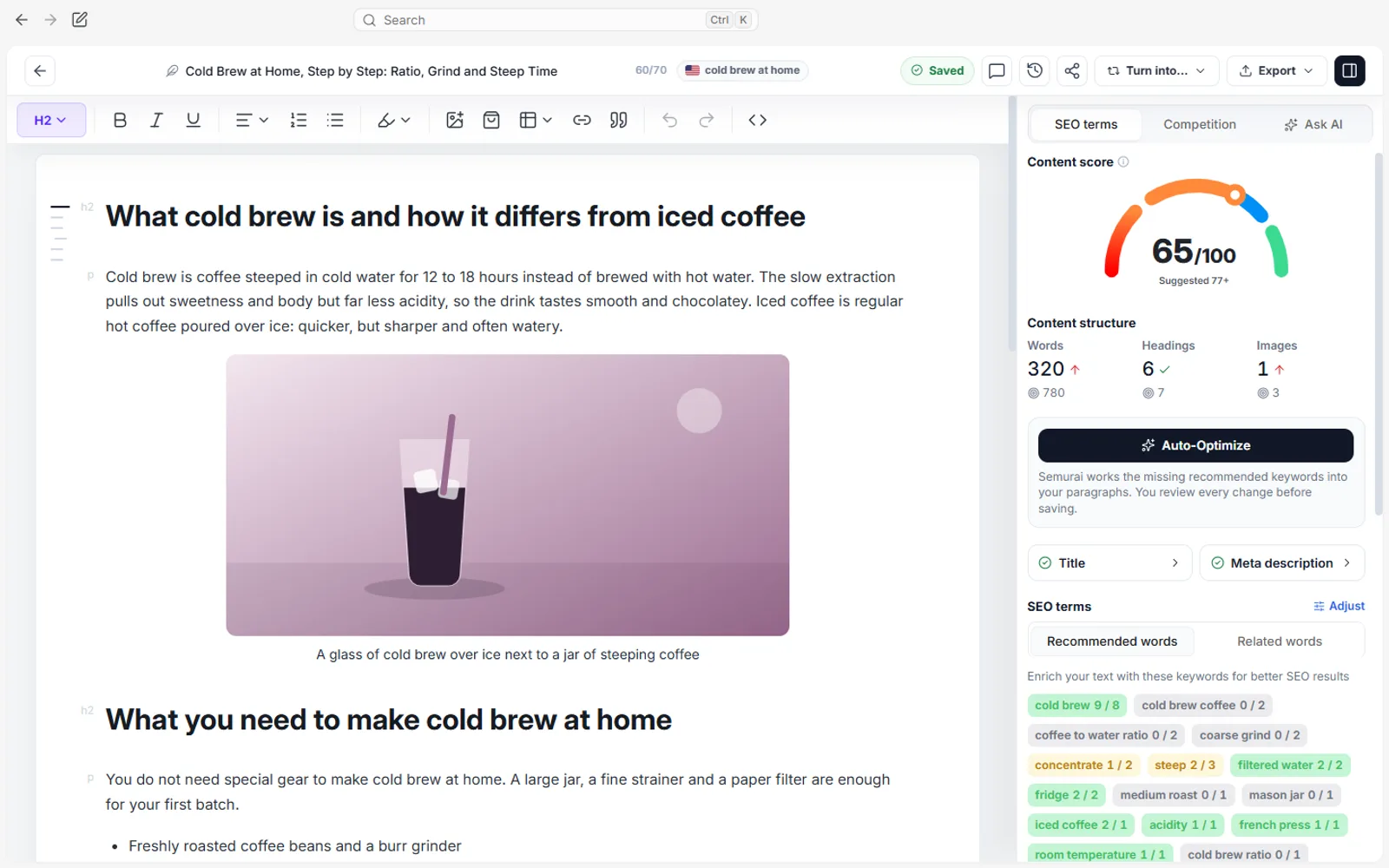
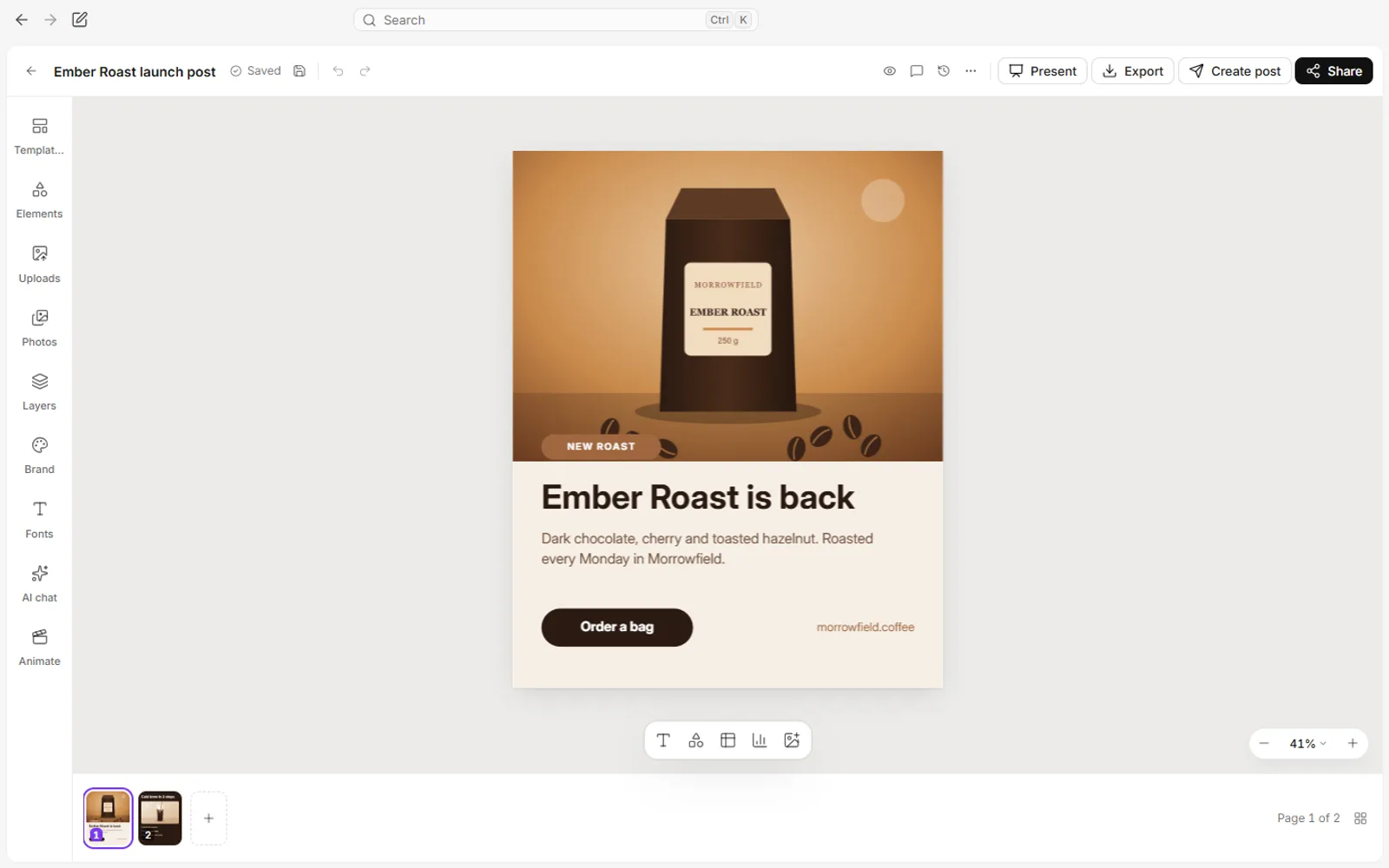
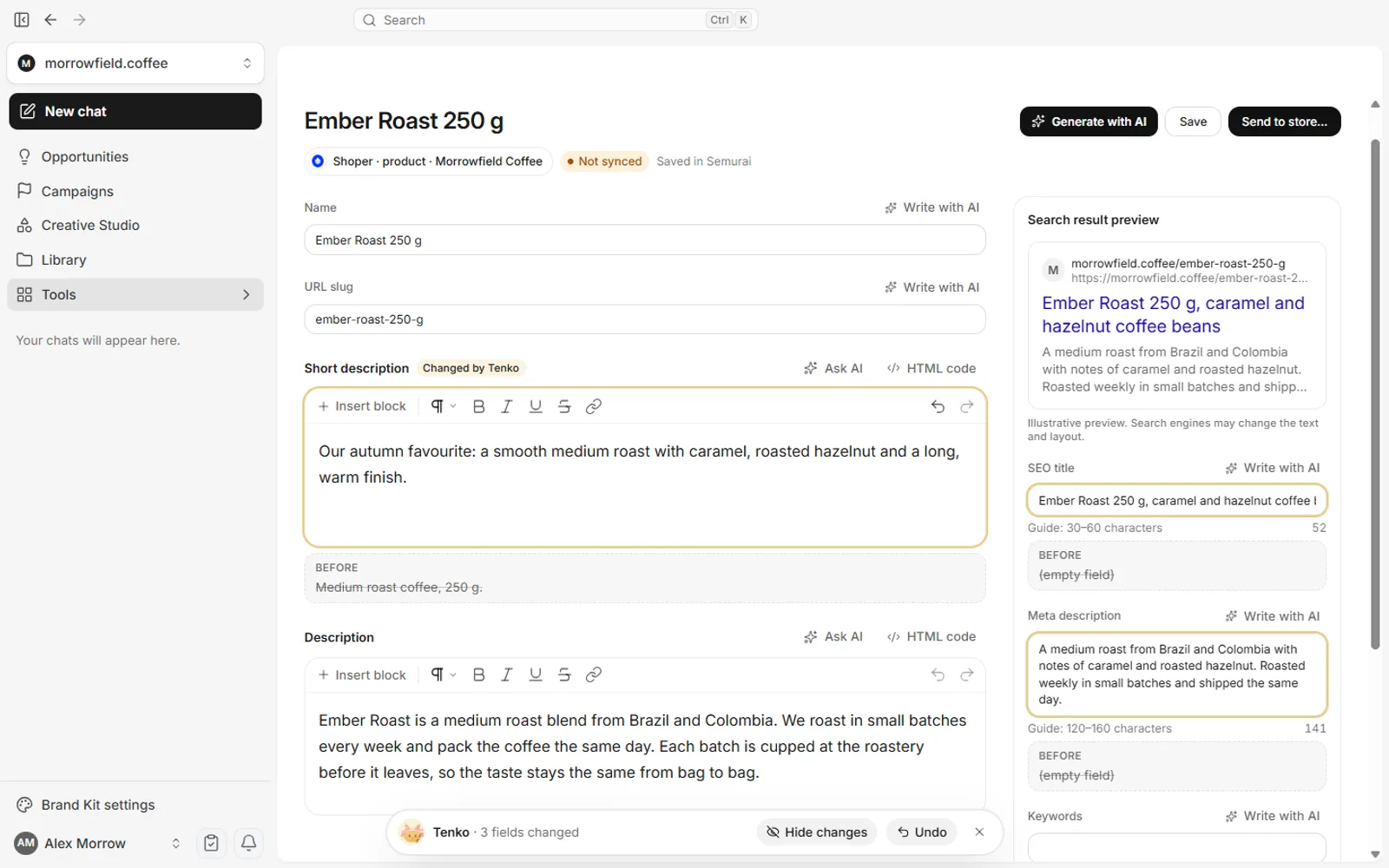
Demo project: Morrowfield Coffee Co. (demo data).
Running a content desk? Semurai for content teams
How it works
One brief in.
A content package out.
Five steps from brief to published. Anything that goes live waits for you, unless you switch on autopublish for a campaign.
- 01
Brief Semur
For example “Launch our Ember Roast blend: an article, a graphic and three posts.” Semur turns it into a plan with owners. When the plan writes full articles or uses a large share of your limit, Semur asks you to approve it first.
- 02
Tenko writes the article
An outline you can approve or edit, then the article in the SEO editor, with a Content Score, internal link suggestions and an FAQ from People Also Ask you can add.
- 03
Somi and Dezaina adapt it
Somi writes a post per channel, Dezaina designs the graphic from your Brand Kit, and Tenko adds product descriptions if you sell online.
- 04
You approve one card
Up to 20 actions on one card. Pick what runs, change a content plan’s channels and counts, or reject it and nothing happens.
- 05
It goes live on your schedule
The article goes to your site, the descriptions to your store once you approve them, the posts to the content calendar. You decide per post, or switch on autopublish for a campaign.
Who does what
The agents create.
You decide what goes live.
Drafts run inside Semurai; anything that goes live on your site, store or channels waits for your click. Campaign autopublish, which you switch on yourself, covers WordPress articles and social posts only.
| Action | Who prepares it | Needs your click? |
|---|---|---|
| The plan for your brief | SemurAgent lead | SometimesWhen it writes full articles or uses a large share of your limit, or always if you choose that in settings. |
| Keyword research and reading your data | KeyresKeyword research | NoReports stay inside Semurai. |
| Outlines, images, designs and e-mail drafts | Tenko, Dezaina | NoA few per run. You can approve or edit an outline before the article. |
| Topic clusters, content plans, articles and social posts | Keyres, Tenko, Somi | YesCovered by the plan you approve or by the approval card. Results stay inside Semurai. |
| Product and category changes in your store | TenkoSEO content | YesAlways. Proposals are saved first, and you review them in Store, in the To approve tab. |
| Publishing to WordPress, Shoper or PrestaShop | Tenko writes it and proposes publishing on the approval card | YesAlways. The one exception: WordPress articles in a campaign where you switch on autopublish yourself. |
| Publishing a social post to a connected channel | Somi prepares it | YesUnless you switch on autopublish for that campaign. |
| Scheduling a publication | Somi proposes the date | YesAlways, unless you switch on autopublish for a campaign (its posts are then scheduled on the channels you chose). Project Autopilot can set a calendar date, which never publishes. |
| Deleting anything | An agent can only propose it | YesAlways. |
Project Autopilot (off by default) can approve a few drafting steps, such as an article or a design, after a veto window, 12 hours by default (2 to 72 hours). It never publishes and never approves a store change.
Compare
Semurai vs a do-it-yourself stack (ChatGPT + Canva + Surfer + a scheduler)
AI content creation software comes in two shapes: one AI-powered content creation platform that handles the handoffs, or strong single tools you connect yourself. The stack column relies on public pages checked in October 2026.
| Semurai | Do-it-yourself stack | |
|---|---|---|
| Who moves work between steps | Semur, to the right agent; up to three work at once | You: copy, paste and re-brief between four tools |
| Writing | Articles, posts, product copy and e-mail drafts, focused on marketing | ChatGPT and Claude are flexible assistants for almost any writing task |
| SEO data | Keyword research, clusters, Google results, Content Score, Search Console | Surfer scores content against Google results; ChatGPT has no keyword volume data built in |
| Design | Creative Studio in nine formats, edited in Canvas, from your Brand Kit | Canva has far more templates and deeper design tools |
| Publishing and approval | Articles to WordPress, Shoper or PrestaShop after your click; posts for Facebook, Instagram and LinkedIn planned in the content calendar | Surfer connects to WordPress from its Standard plan; a scheduler posts to its channels; approval differs per tool |
| Typical cost | Free plan; Starter $39, Growth $99 a month (net), all eight agents on paid plans | One subscription per tool, e.g. Surfer from €49 a month billed yearly (€59 billed monthly; Surfer pricing) and Claude Pro $20 a month (Claude pricing), checked October 2026 |
If design is most of your work, pair Semurai with Canva, and use ChatGPT or Claude for open-ended tasks: Semurai takes over the handoffs between your tools.
Languages and brand
14 languages,
your brand in every task.
The app and the agents work in 14 languages, for the markets you sell to.
- English
- Polish
- Spanish
- Brazilian Portuguese
- German
- French
- Italian
- Dutch
- Hungarian
- Romanian
- Danish
- Norwegian
- Indonesian
- Vietnamese
The same 14 languages
Interface and content in the same 14 languages. Sign-up and billing are in English or Polish.
Brand Kit
Every agent works from your Brand Kit: profile, audience, voice, visual style and guidelines.
Memory you control
Memory keeps what you ask it to and your lasting preferences. You can delete any entry.
Web and Windows app
Use Semurai in the browser or as an AI content creation app on Windows.
Plans
Pay for capacity,
not for features.
Every paid plan includes all eight agents and every tool. Plans differ in AI usage, seats, tracked keywords and storage.
Free
$0
Free forever, with monthly usage limits. No credit card.
Try the whole flow on a monthly allowance: 1 SEO article, 5 social posts, 5 product descriptions, 2 AI images and 1 content plan.
- 10 tracked keywords
- 250 MB storage
- Monthly allowance of articles, posts, audits and more
Starter
$39/ month
or $29 / month, billed yearly
For solo marketers and small businesses.
One person and a steady rhythm: 1x AI usage, 20 tracked keywords and 5 GB for media.
- Every agent and every tool
- 1× AI usage
- 20 tracked keywords
- 5 GB storage
- 1 team seat
- Best fit for weekly content
Growth
$99/ month
or $79 / month, billed yearly
For teams that publish every week.
Articles, posts and designs every week: 3x the AI usage of Starter, 2 seats, 40 tracked keywords and 25 GB for media.
- Every agent and every tool
- 3× AI usage
- 40 tracked keywords
- 25 GB storage
- 2 team seats
Read more
More on AI content creation
from the Semurai blog.
A practical workflow from brief to published content, and the tools that do each job.
AI content creation
A stage-by-stage workflow: what AI does, what you do, Google's rules and brand voice.
Read the AI content creation guideBest AI tools for content creation
12 tools by job: writing, design, video, avatars, editing and all-in-one.
Compare AI tools for content creationBest AI marketing tools
15 tools sorted by task, from writing and SEO to social, design, email and ads.
See the best AI marketing tools
FAQ
Questions about AI content creation platforms.
When is an AI content creation platform better than separate tools?
Our assessment: when the handoffs between tools cost you more time than the writing. A platform like Semurai takes one brief to an article, posts, graphics and store descriptions, with publishing waiting for your click. If one job fills most of your week, a dedicated tool usually goes deeper: Canva for design, Surfer for optimising against Google results, ChatGPT or Claude for open-ended writing.
How does Semurai keep content on brand?
Every agent works from your Brand Kit: profile, audience, voice, visual style and guidelines. Articles, posts and designs start from the same kit, and you can edit any draft before it goes anywhere.
Can I edit what the agents create?
Yes. Articles open in the SEO editor, where you can approve or edit the outline first. Designs open in Canvas, and store descriptions arrive as proposals you can edit before you approve them. Social posts wait in the content calendar for your decision.
Can I publish directly from Semurai?
Yes, after your approval. Articles go to WordPress, Shoper or PrestaShop and product copy to your store. Posts for Facebook, Instagram and LinkedIn are planned in your content calendar. For X, Semurai prepares drafts, and e-mails stay drafts you send yourself.
Does Semurai create images and videos?
Yes, in marketing formats. Dezaina designs graphics, carousels and ads, the agents generate AI images, and video is one of the nine Creative Studio formats, with MP4 and GIF export. For AI avatar videos or editing long recordings, tools such as Synthesia, HeyGen or Descript go further.
What does Semurai cost compared with a do-it-yourself stack?
Semurai has a Free plan; Starter costs $39 and Growth $99 a month (net), less on yearly billing, and every paid plan includes all eight agents. A do-it-yourself stack adds up per tool: Claude Pro costs $20 a month and Surfer starts at €49 a month billed yearly (€59 billed monthly, checked October 2026), before design and scheduling tools.
Give Semur one brief.
Decide what goes live.
Start on the Free plan. The agents write, design and plan your first content, and you decide what goes live.
- Free forever plan
- No credit card
- Set up in about 3 minutes


