Content marketing14 min read
AI content creation: a practical workflow from brief to published content
AI can research, draft, design and schedule most of your content. It cannot decide what your brand stands for or vouch for the facts. Here is a workflow that splits the work between the two, stage by stage, with the tools for each job.
 BySemurai TeamThe people behind SemuraiPublished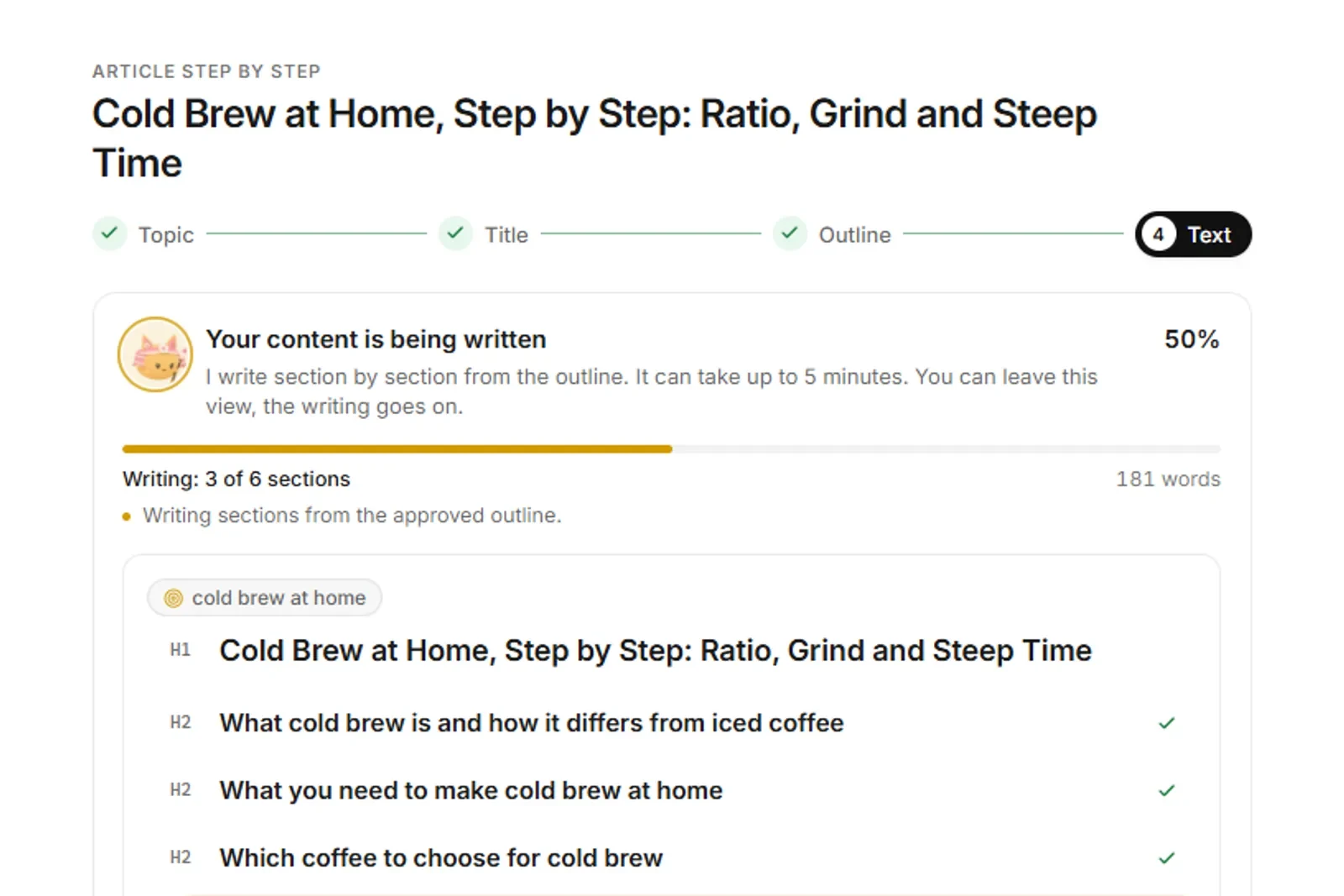
AI content creation is the use of generative AI to research, draft, design, adapt and refresh content (articles, social posts, graphics, product descriptions and e-mails), with a person setting the goal, checking the facts and approving what gets published. It works best as a workflow, not a single prompt.
Most guides to AI content creation list fifty prompts or twenty tools. This one follows a single piece of content from brief to published page, then to social posts, visuals and a refresh six months later. At each stage it says what AI does well, what you still have to do yourself and which tool fits the job. It also covers what Google says about AI-generated content, how to keep your brand voice, and how to write pages that AI answers can quote. The last part shows the same workflow in Semurai, our AI content creation platform.
What is AI content creation?
AI content creation means using generative AI models to produce or speed up content work: finding topics, outlining, drafting text, generating images and video, rewriting for each channel and updating old pages. The human role shifts from writing every word to briefing, editing, fact-checking and deciding what goes live.
Generative AI for content creation covers three kinds of tools. General assistants such as ChatGPT, Claude or Gemini write and rewrite anything you ask, but you bring the data and do the publishing. Specialist tools do one job well: Canva for design, Descript for editing video and podcasts, Synthesia or HeyGen for avatar video, Grammarly for proofreading. Platforms connect several stages, from keyword data to the content calendar, so the output of one step becomes the input of the next. Most teams end up with a mix of the three.
How to use AI for content creation: the workflow, stage by stage
To use AI for content creation, give it the repetitive, data-heavy part of each stage and keep the judgment calls for yourself. The table shows how that split looks across a full AI content creation workflow.
| Stage | What AI does | What a human does |
|---|---|---|
| Research | Pulls keyword data, reads the pages that rank, groups topics into clusters, lists questions people ask | Picks the topics that matter for the business, adds what customers actually ask |
| Plan | Turns clusters into a content plan with formats, channels and dates | Sets priorities, removes topics you cannot speak to with authority |
| Draft | Writes outlines and first drafts, suggests headings, FAQs and internal links | Approves the outline, adds experience, examples and data, edits for voice |
| Visuals | Generates images, social graphics, carousels and short video from a brief | Chooses, corrects brand details, checks people, products and text in images |
| Social | Rewrites the article into posts for each channel and proposes a schedule | Cuts what sounds generic, checks claims, decides timing |
| Publish | Prepares the page, metadata and structured data, or the store product copy | Approves publishing to the site, store or channel |
| Refresh | Flags pages that lose rankings or go out of date, drafts the update | Confirms what changed in the real world, approves the new version |
1. Research: start from search data, not from a blank prompt
Research is where AI saves the most time and where a general chatbot is weakest, because it does not see live search volumes or today's results. Use a tool with real data, such as an AI SEO agent, to pull keywords, group them into topic clusters and read the pages that already rank. Then ask the question no tool can answer: which of these topics can we cover better than anyone, because we have the product, the data or the experience?
2. Plan: one page per search intent
A content plan maps each cluster to one page, a format and a date, so two of your own articles do not compete for the same query. AI can draft the plan quickly, including the social posts and e-mails that will come out of each article. Your job is to cut it down: a short plan you can deliver well beats a long one that produces thin pages.
3. Draft: approve the outline before the article
The outline is the cheapest place to fix an article. Ask the AI for an outline built from the pages that rank, check that it answers the question in the first lines, add the sections only you can write (a test, a case, a price you paid, a mistake you made), and only then let it draft. While you edit, a content score that compares terms, length and headings with the top results helps you see what is missing without stuffing keywords.
4. Visuals: brief like a designer
Image and design models now produce usable social graphics, carousels and ad variants quickly. They work best from a brief with the format, the message, the brand colours and fonts, and a reference. Always check the details AI still gets wrong: product shapes, logos, hands, small text and anything that looks like a real person.
5. Social: repurpose, then rewrite
One article can feed a week of social posts: a LinkedIn post with the main argument, an Instagram carousel with the steps, a short video with one tip. AI is good at the first cut. Read every post as a follower would and delete lines that could belong to any brand.
6. Publish: keep a person on the button
Publishing is where mistakes become public, so it is the one step to keep behind an approval. AI can prepare the page, title, meta description, FAQ and structured data, or the product description for your store. A person checks it and clicks publish.
7. Refresh: the stage most teams skip
Content decays: prices change, screenshots go out of date, a competitor publishes something better and your page slips from position 4 to 12. AI can watch rankings, flag pages that lose ground and draft an update. You confirm what actually changed and add the new date. Refreshing a page that already ranks is often a faster win than writing a new one.
What content can you create with AI?
You can create almost every common marketing format with AI, but the amount of editing each one needs varies a lot. These are the five formats where AI for content creation pays off most for small teams.
Blog articles and guides
AI handles research, outlines and first drafts well. It struggles with original insight, so plan for real editing time on every article: add examples, numbers you can source and your own opinion. Long guides benefit most from a fixed structure (answer first, then detail) and an FAQ built from questions people actually search.
Social media posts
Short formats suit AI: variations, hooks, captions and hashtags take little time. The risk is sameness. Give the model your best past posts as examples and keep a list of phrases your brand never uses.
Graphics, carousels and short video
Design tools with AI now generate on-brand layouts from a text brief, and video tools cut, caption and dub footage. Use them for volume (variants, sizes, languages) and keep a designer's eye for the final pick.
Product descriptions
For online stores, AI turns product data into unique descriptions, category texts, meta tags and image alt text at a scale that is hard to reach by hand. Feed it accurate specifications, check every claim about materials, sizes and certifications, and review the changes before they reach the live store.
E-mail drafts
AI writes solid first drafts of newsletters, launch e-mails and follow-ups, including subject line variants to test. Keep the sending in your e-mail tool, where your lists, consent records and unsubscribe links live.
Quality and brand voice: keeping AI content worth reading
AI content is worth reading when a person adds what the model cannot: experience, verified facts and a voice that sounds like your brand. Treat every draft as a first draft and build these checks into the workflow.
- Write the voice down. A one-page voice guide (who you write for, words you use and avoid, how formal you are, three example paragraphs) does more for brand voice than any prompt trick. Give it to every tool you use.
- Check every fact. Language models still invent statistics, quotes, prices and links. Verify numbers against the original source, add the date you checked them and delete anything you cannot source.
- Add experience on purpose. Google's quality guidance talks about E-E-A-T: experience, expertise, authoritativeness and trust. Photos you took, tests you ran, mistakes you made and customer questions you answered are the parts no competitor's AI can copy.
- Edit for one reader. Cut the throat-clearing intro, the generic conclusion and every sentence that would fit any company. Short sentences, concrete nouns, real examples.
- Name the author. Put a real byline where readers expect one and say how the content was made when readers might wonder.
Is AI content bad for SEO? What Google says
No: Google does not penalise content because AI helped make it. It acts against content made mainly to manipulate search rankings, whatever produced it. In its February 2023 post, Google Search's guidance about AI-generated content, Google says its systems reward high-quality content "however it is produced". The same post says that using automation, AI included, mainly to manipulate rankings breaks its spam policies, and it points to Google's guidance on thinking about who created a page, how and why, and recommends accurate author bylines where readers would expect them.
The practical line sits in the scaled content abuse section of Google's spam policies (last updated August 2026). It covers generating many pages mainly to manipulate rankings rather than to help people, no matter how they are made, and its first example is using generative AI to produce many pages that add no value for users. Scraping content to generate many pages (including automated translating or synonymizing) and stitching pages together without adding value are listed too. So the risk is not AI. The risk is publishing more than you can make useful.
- Safe: AI drafts that a person edits, fact-checks and enriches before publishing; AI help with outlines, metadata, FAQs and refreshes.
- Risky: hundreds of near-identical location or product pages, AI rewrites of competitors' articles, publishing drafts nobody read.
How to get your content cited by AI answers
AI answers such as Google's AI Overviews and chat assistants tend to quote passages that answer a question directly and can be lifted out on their own. You cannot force a citation, but you can write pages that are easy to quote.
- Short definitions first. Start each section with one or two sentences that answer its heading, then add the detail. A 40-60 word definition is easy to quote whole.
- Tables for comparisons. Stages, prices, features and pros and cons read better as a table, for people and for machines.
- Dated facts with sources. "Checked October 2026" next to a price, with a link to the source, tells the reader and the model how fresh the claim is.
- Questions in the reader's words. An FAQ built from People Also Ask questions, with plain two to four sentence answers, matches how people ask assistants.
- Consistent names. Call your product, your features and your people the same thing on every page.
- Structured data. Article and FAQ markup help search engines understand the page. They do not guarantee a citation.
Which tools fit each stage
No single tool covers writing, design, video and publishing equally well, so most teams combine a few. This is a fair starting stack.
- ChatGPT or Claude: for drafting and rewriting. General assistants for outlines, drafts, rewrites and brainstorming. You bring the keyword data and do the publishing yourself, unless you connect them to Semurai through its SEO MCP server.
- Canva: for quick on-brand graphics. A design suite with AI tools for social graphics, presentations and simple video.
- Descript: for editing video and podcasts like a document. You edit the transcript and the footage follows.
- Synthesia or HeyGen: for avatar and translated video. Presenter videos without a camera, in many languages.
- Grammarly: for the final proofread. Catches grammar, clarity and tone issues wherever you write.
- Semurai: for small teams that want the whole workflow in one place. A team of AI agents that research keywords, write articles, design graphics, plan social posts and prepare store product copy, with publishing waiting for your approval.
For a longer comparison with Gemini, Jasper, Copy.ai, InVideo and more, each with features, prices and caveats, see our list of the best AI tools for content creation.
How to start AI content creation in Semurai
In Semurai, the workflow above runs as one project with a team of AI marketing agents: Keyres researches keywords, Tenko writes, Dezaina designs, Somi plans social posts and Semur coordinates the work. The agents prepare drafts inside Semurai; publishing to your site, store or a connected channel waits for your approval. The one exception: a campaign where you switch on autopublish yourself, for the WordPress site and social channels you choose. Here is the path on a demo project for a fictional roastery, Morrowfield Coffee Co.
Draft the article in the SEO editor
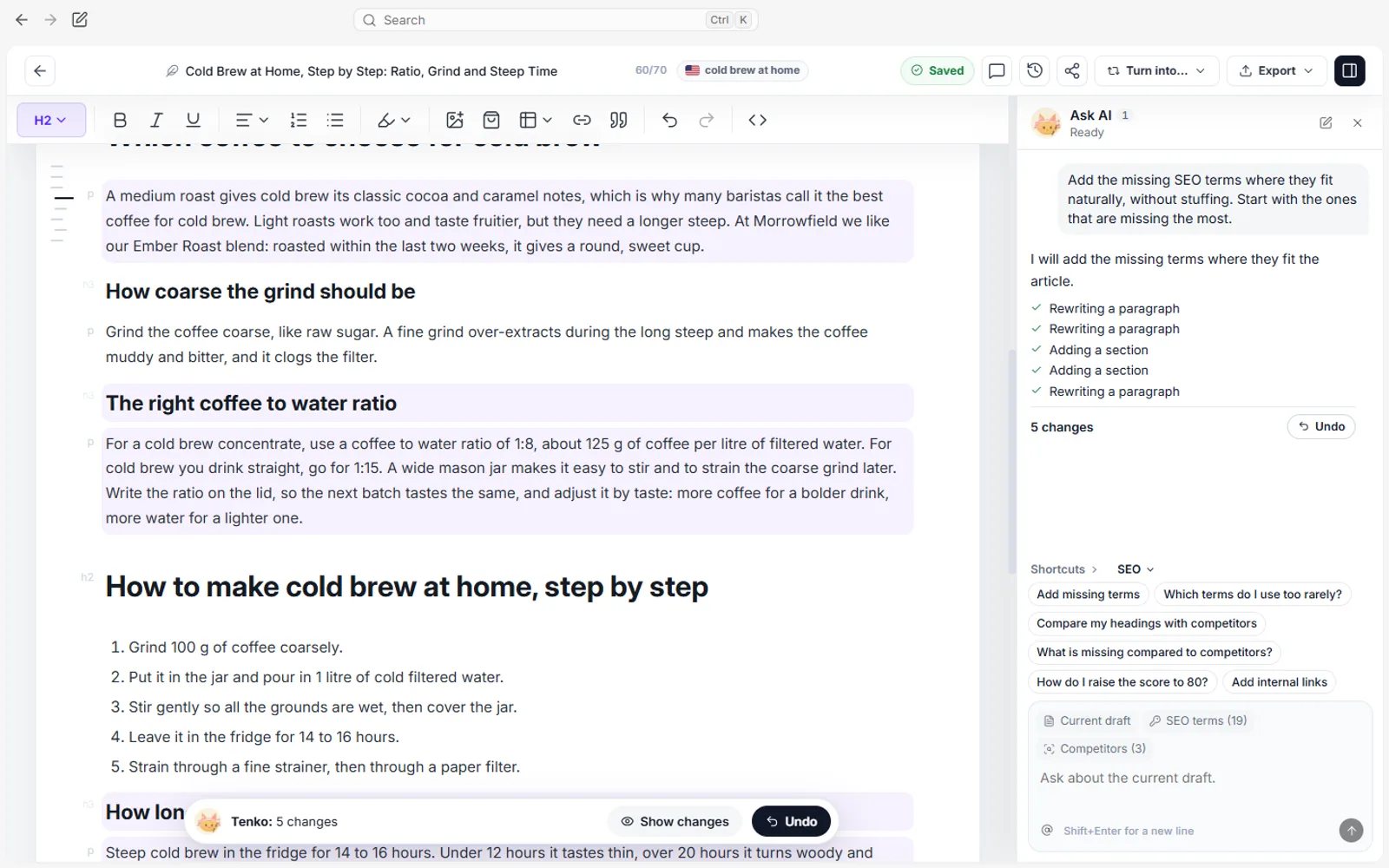
Ask for an article on "Cold brew at home, step by step". Tenko proposes an outline, and you can approve or edit it before the article is written. In the SEO editor, the Content Score compares terms, word count and headings with the pages that rank and counts your images, Ask AI edits the text in place, and internal link suggestions come from your own site. You can also add an FAQ from People Also Ask questions and structured data from the editor.

Demo project: Morrowfield Coffee Co. (demo data). The draft's Content Score in the SEO editor. Get a first version of the visuals
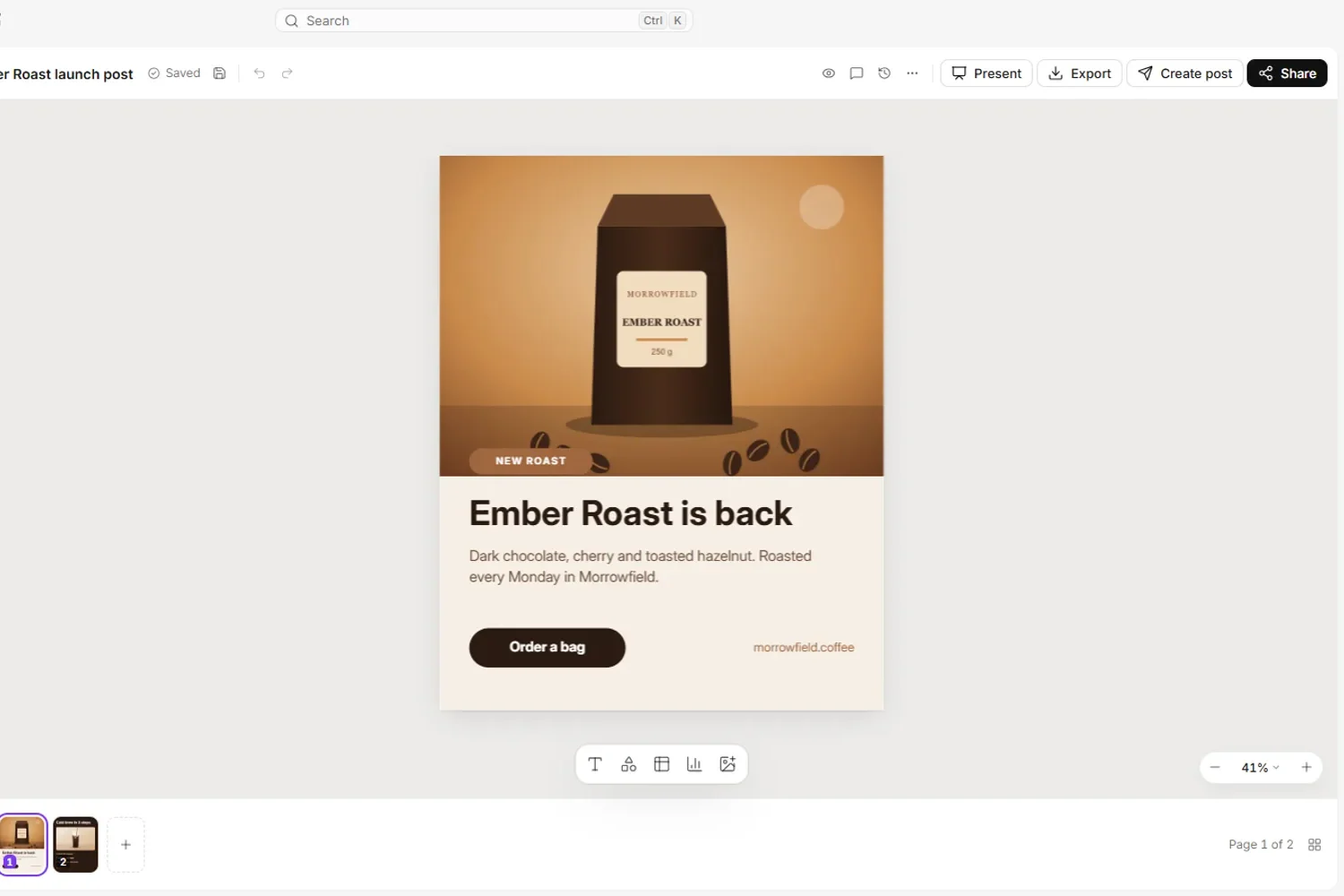
In Creative Studio, describe the graphic you need, for example a carousel with the five cold brew steps. Dezaina produces a first version in your brand colours and fonts. Creative Studio covers nine formats, from social graphics and carousels to ads, presentations and short video.

Demo project: Morrowfield Coffee Co. (demo data). Dezaina designs the first version of a carousel. Polish it in the Canvas editor
Open the design in Canvas to move elements, change copy, swap photos and resize for other channels. Export as PNG, JPEG, PDF, MP4 or GIF, or save it to the media library for the agents to use in posts.

Demo project: Morrowfield Coffee Co. (demo data). Exporting a design from Canvas. Generate product descriptions and review them
If you sell online, connect a WooCommerce, Shoper or PrestaShop store. Tenko drafts product and category descriptions, meta tags and image alt text as proposals. You compare each proposal with the current text, edit it and approve it; the store changes only after your click.

Demo project: Morrowfield Coffee Co. (demo data). A product description proposal waiting for review. Plan the posts in the content calendar
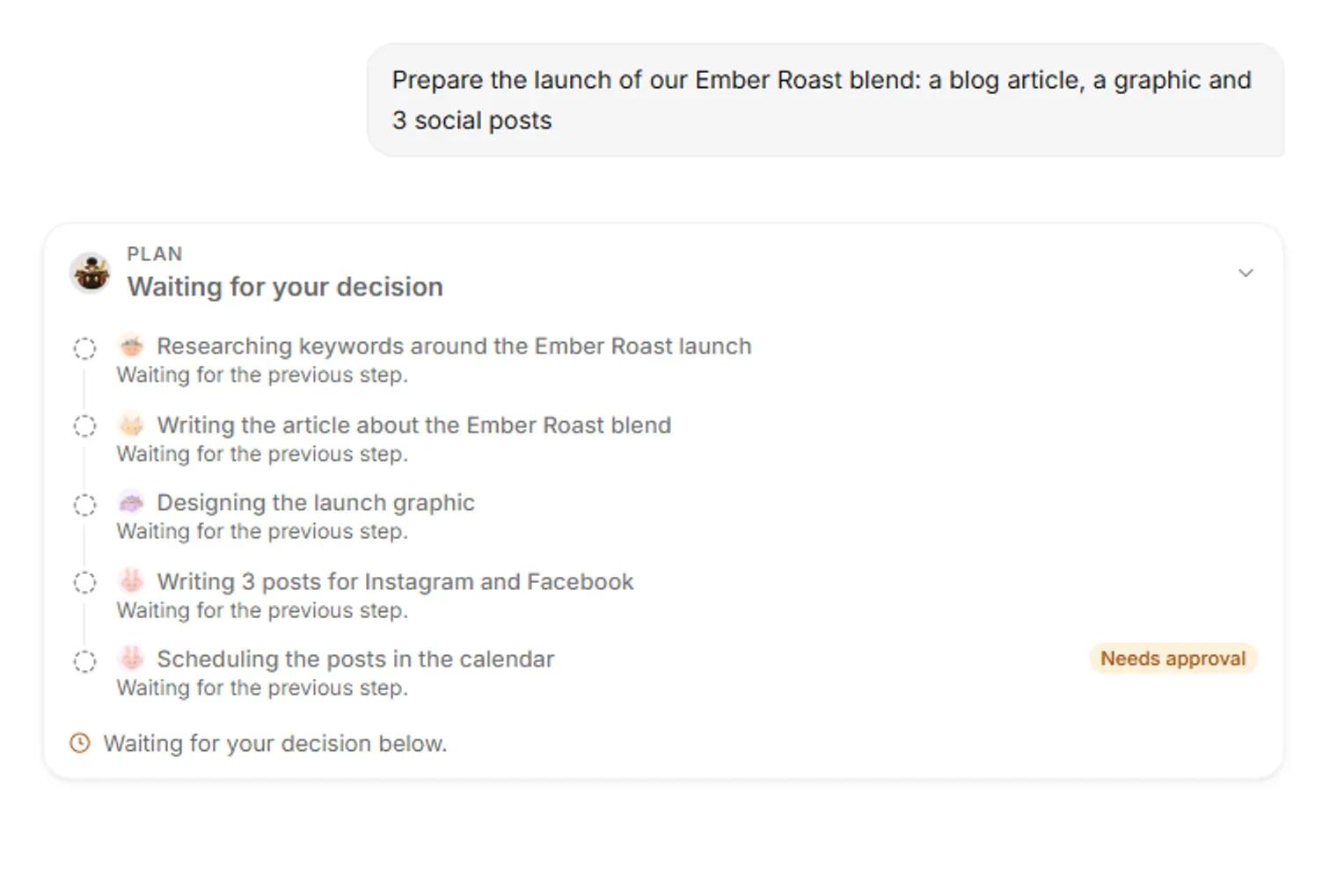
Somi turns the article into posts for Facebook, Instagram and LinkedIn and proposes dates for them in the content calendar next to the blog post and the newsletter draft. You decide when each post is planned, and publishing to a connected channel waits for your click.

Demo project: Morrowfield Coffee Co. (demo data). An article in progress and a LinkedIn post waiting for your approval in the content calendar.
RecordingTranscript
- Type the main keyword, the country and language are set
- Generate titles: Tenko writes title ideas
- Choose the title you like best
- Create the outline: Tenko plans the headings
- Check the headings, then write the article
- Tenko writes the article section by section
- The finished article opens in the editor
Semurai drafts e-mails for you to send from your e-mail tool, and drafts and plans posts for Facebook, Instagram and LinkedIn in the content calendar. There is a free plan to try the workflow.
Where to start this week
Start with one piece of content, not a new process. Pick a topic you know better than your competitors, let AI do the research and the outline, write the parts only you can write, and edit the draft with the checklist above. Then turn it into three social posts and one graphic, publish it after a proper read, and put a date in the calendar to refresh it. Once that loop works for one article, it works for twenty.
Frequently asked questions
Which content types can AI create today?
AI can help with blog articles and guides, social media posts, graphics, carousels and short video, product descriptions and e-mail drafts. Short formats such as posts and captions need the least editing; articles need the most, because AI struggles with original insight. A person still sets the goal, checks facts, adds experience and approves what gets published.
How much AI content can I publish safely?
Only as much as you can edit, fact-check and make useful. Mass-producing pages with AI without adding value falls under Google's scaled content abuse policy, so volume on its own is the risk. Google says it rewards helpful, high-quality content however it is produced, and it acts against content made mainly to manipulate rankings.
Do I need to disclose that content was made with AI?
Google suggests AI or automation disclosures where readers might reasonably ask how a piece was created, and accurate author bylines where readers expect them. It also says giving AI an author byline is probably not the best way to make that clear. Check your platform's and market's own rules too.
Can AI write in my brand voice?
Yes, if you give it good inputs. Write a short voice guide, share examples of your best content and list words you never use. Expect to edit the first drafts, and keep the voice guide in every tool you use so the style stays consistent.
Will AI replace content creators?
AI replaces a lot of repetitive tasks, not the people who decide what to say. Creators who use AI spend less time on first drafts and resizing, and more on ideas, interviews, testing and editing. The skills that matter most now are judgment, expertise and taste.