Content marketing12 min read
Best AI tools for content creation in 2026: 12 tools by the job they do best
Twelve AI tools for content creation, grouped by the job each does best: writing, design, video, avatar video, proofreading and an all-in-one marketing team. Same template for every tool, with prices checked on the vendor's page in October 2026.
 BySemurai TeamThe people behind SemuraiPublished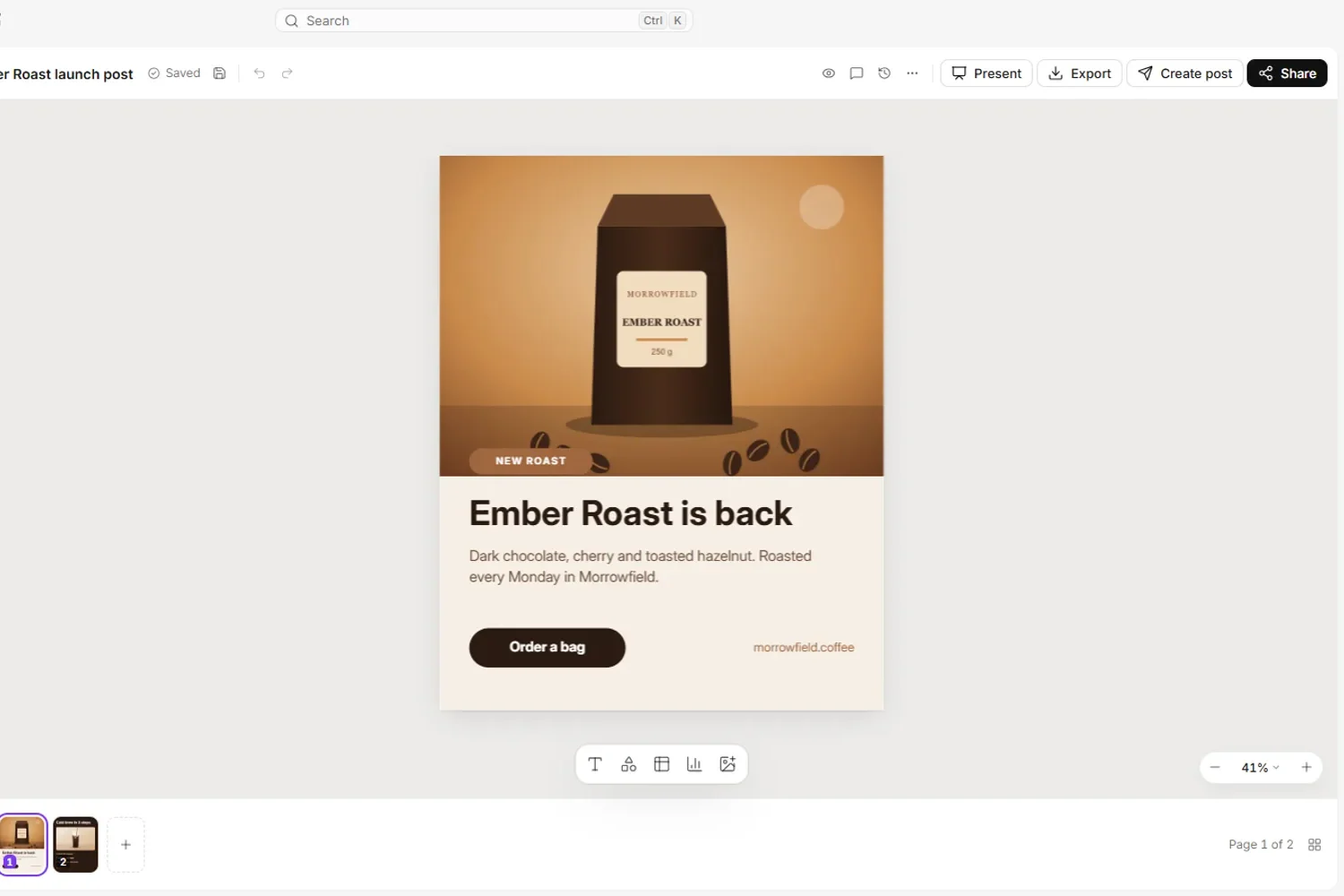
Quick answer
There is no single best AI tool for content creation; the right pick depends on the job. For drafting, start with Claude, ChatGPT or Gemini (Gemini if your team lives in Google Workspace). For marketing copy under brand rules, look at Jasper. For graphics, Canva. For editing video and podcasts, Descript, and InVideo for prompt-led video. For presenter videos without a camera, Synthesia or HeyGen. For the final proofread in English, Grammarly. If you are a small marketing or e-commerce team that wants an AI content creation platform where research, articles, graphics, social posts and store product copy are handled by one team of AI agents, with publishing waiting for your approval, Semurai is built for that.
| Tool | Best for | Free plan | Paid from (checked Oct 2026) |
|---|---|---|---|
| Semurai | Small teams that want the whole workflow in one place | Yes | Starter $29/mo yearly or $39 monthly |
| ChatGPT | Everyday drafting and brainstorming | Not verified | Not verified (secondary sources: Plus $20/mo) |
| Claude | Long documents and careful editing | Yes | Pro $17/mo yearly or $20 monthly |
| Gemini | Teams that work in Google Workspace | Yes | Google AI Plus $4.99/mo, AI Pro $19.99/mo |
| Jasper | Marketing copy under brand rules | 7-day trial | Pro $59/seat/mo yearly or $69 monthly |
| Copy.ai | Sales and marketing workflows | Not shown | Chat $24/mo yearly or $29 monthly (5 seats) |
| Canva | Quick on-brand graphics | Not verified | Not verified |
| Descript | Editing video and podcasts by text | Yes | Hobbyist $16/mo yearly or $24 monthly |
| InVideo | Prompt-led video editing | Not listed | Starter €10/seat/mo billed yearly |
| Synthesia | Training and explainer videos with avatars | Yes | Starter $14/mo yearly or $19 monthly |
| HeyGen | Avatar video and translation | Yes | Creator $24/mo yearly or $29 monthly |
| Grammarly | Proofreading and tone in English | Yes | Pro €12/mo (EUR shown) |
How we picked these AI tools for content creation
We started from the tools that appear most often on the "best AI tools for content creation" lists we read in October 2026, then grouped them by the job they do best. ChatGPT, Claude and Canva appeared on all four lists we analysed, Descript and Gemini on three, and Jasper, Copy.ai, Grammarly and InVideo on two. We added Synthesia next to HeyGen because avatar video is its own job, and left out app builders that some lists include. Semurai, our product, comes first; the other sections follow by job: writing, design, video, avatar video and proofreading. Prices and features as listed on each vendor's website in October 2026.
- Job fit: what the tool is clearly best at, not everything it can do.
- Control over the output: brand voice, editing, review and approval before anything is published.
- Where the output goes: copy and paste, export, or publishing to a site, store or channel.
- Price transparency: a published price with clear billing terms, a free plan or a trial.
- Watch-outs: usage caps, credits that expire, watermarks, regional pricing and missing integrations.
If you are new to the topic, our guide to AI content creation explains the workflow these tools plug into, stage by stage.
Best all-in-one AI marketing team: Semurai (our product)
Semurai: best for small teams that want the whole workflow in one place
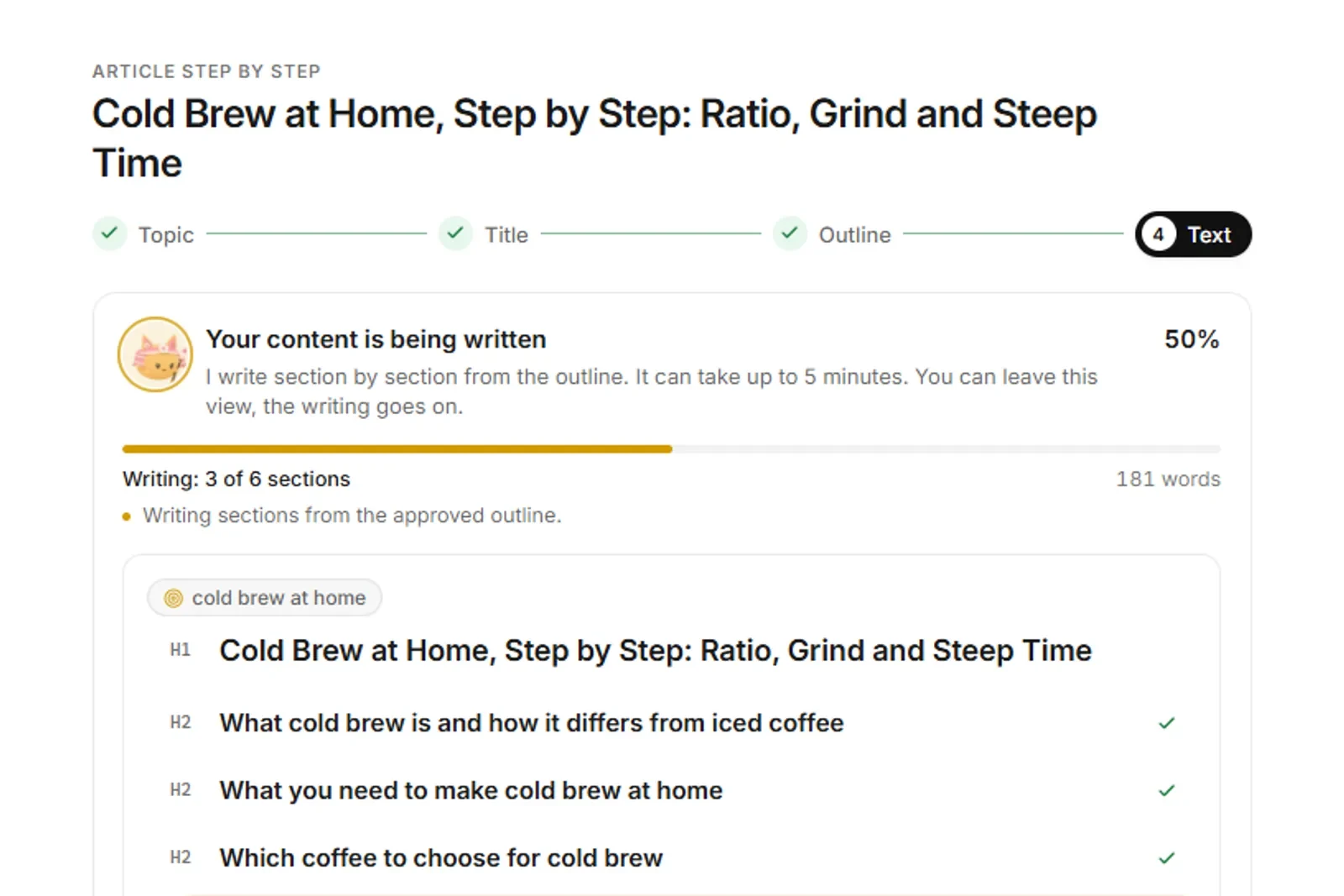
Semurai is a team of eight AI agents for marketing: Semur leads, Keyres researches keywords, Tenko writes, Hime audits the site, Spynobi watches competitors, Rankmaru tracks rankings, Somi handles social media and Dezaina designs. They work on drafts in one project, and you approve before anything is published. The one exception: a campaign where you switch on autopublish yourself, for the WordPress site and social channels you choose.
RecordingTranscript
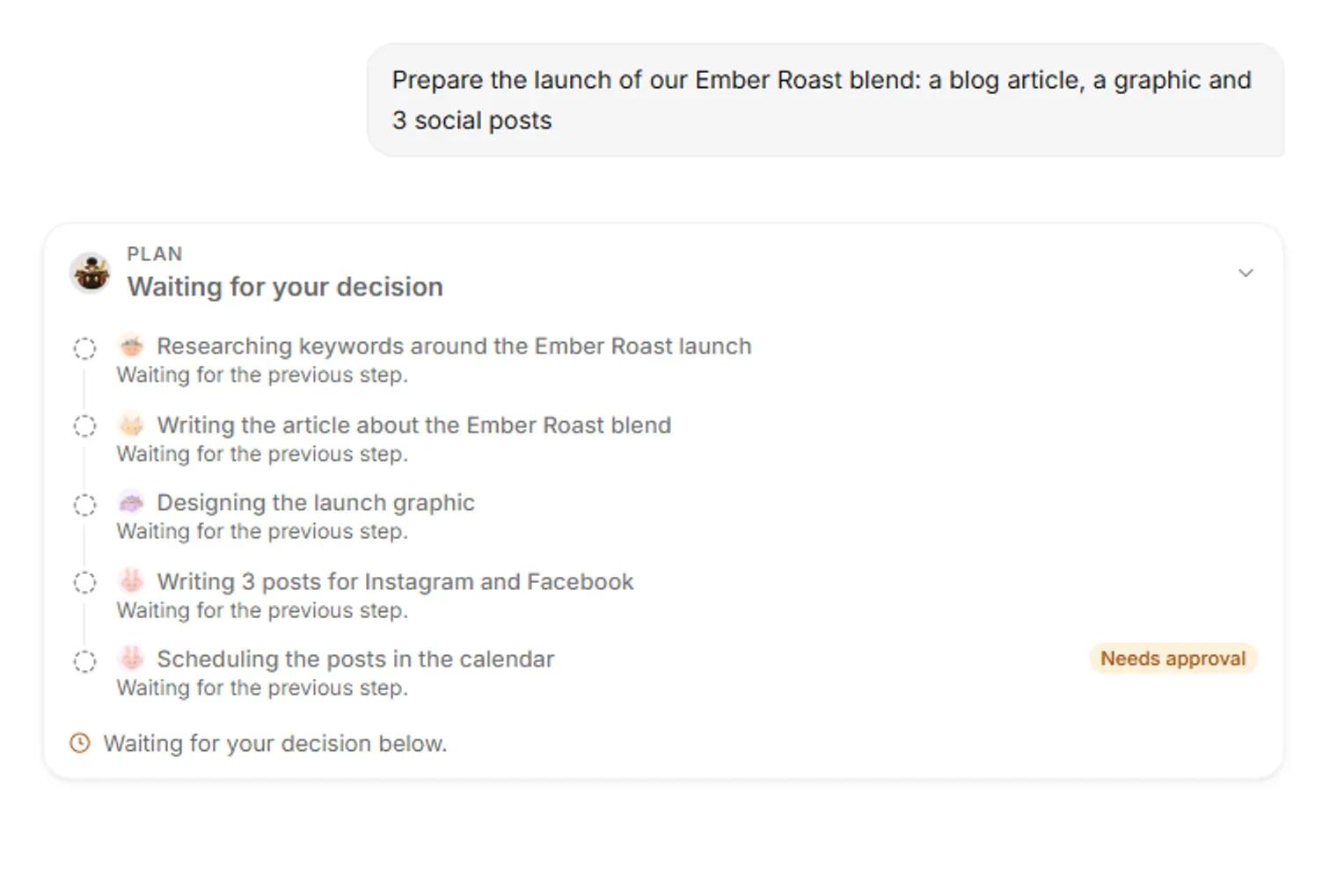
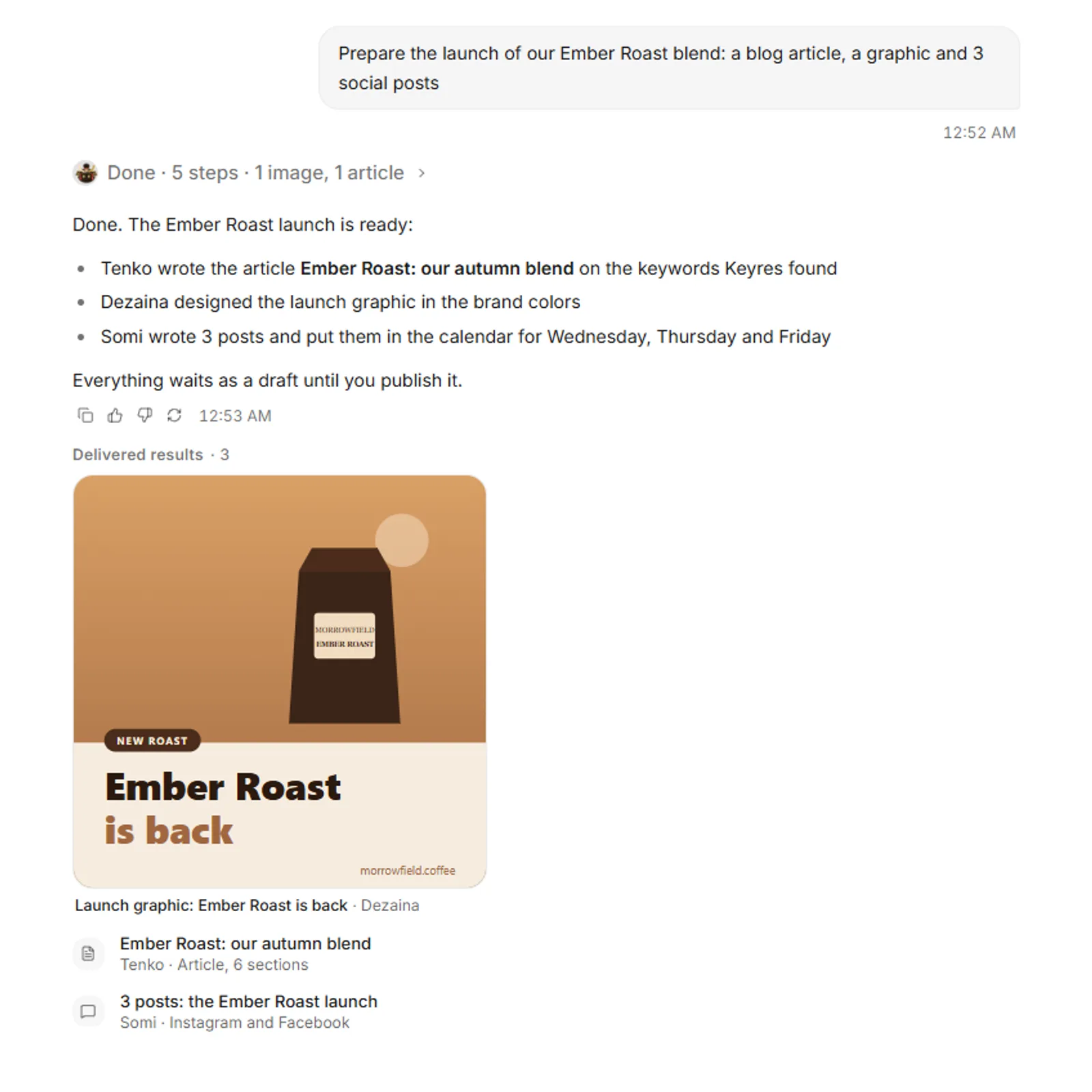
- Semur's plan for the Ember Roast launch waits for your OK
- Approve it, and Keyres starts with the keywords
- Tenko writes the article while Dezaina designs the graphic
- Somi writes 3 posts for Instagram and Facebook
- Scheduling the posts waits for your approval
- Each step shows its result: keywords, article, graphic, posts
- Best for: small marketing and e-commerce teams that want keyword research, articles, graphics, social posts and store product copy in one workflow.
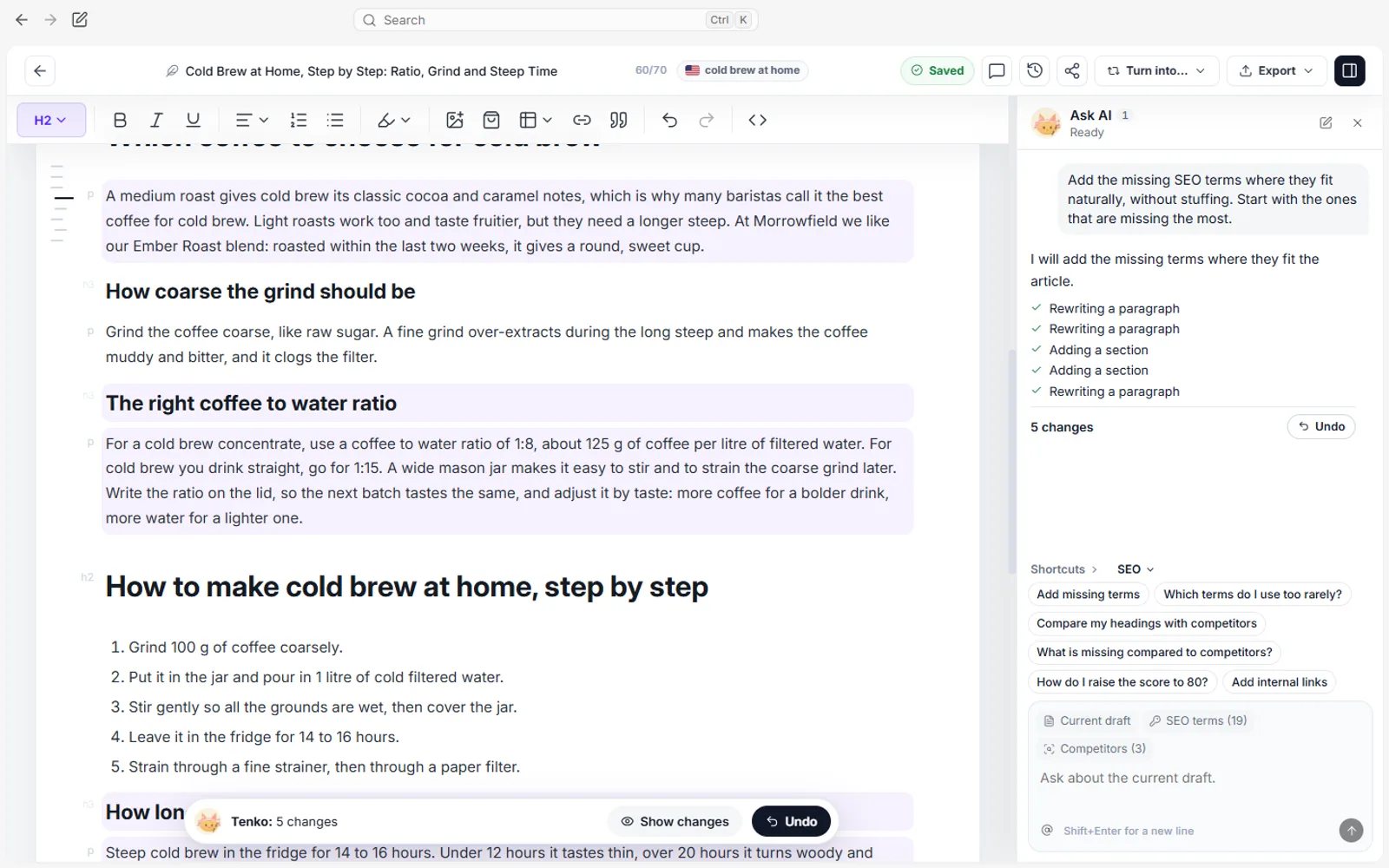
- Key features: SEO editor with Content Score, an outline you can approve or edit, internal link suggestions and an FAQ from People Also Ask with structured data; Creative Studio and the Canvas editor (nine formats, export to PNG, JPEG, PDF, MP4 and GIF); a content calendar where Somi drafts and plans posts for Facebook, Instagram and LinkedIn; product and category copy for WooCommerce, Shoper and PrestaShop as proposals you approve; app and content in 14 languages.
- Price (checked October 2026, net): Free plan; Starter $39 a month or $29 billed yearly; Growth $99 or $79; Pro $249 or $199. Plans differ in AI usage, tracked keywords, storage and team seats (see Semurai pricing).
- Watch out for: Semurai is built for articles, graphics and posts, so pair it with Descript, HeyGen or Synthesia if recorded or avatar video is your main format.

Best AI tools for writing
ChatGPT: best for everyday drafting and brainstorming
ChatGPT is OpenAI's general-purpose assistant and the tool most people try first for writing with AI. It drafts, rewrites, summarises and brainstorms in almost any format.

- Best for: quick drafts, outlines, headline and hook variations, rewriting for different audiences.
- Key features: conversational drafting and editing in one chat, reusable instructions and long conversations for context.
- Price: secondary sources list ChatGPT Plus at $20 a month; check OpenAI's pricing page before you buy.
- Watch out for: no keyword data, content scoring or CMS publishing built in, so research and publishing stay manual. Facts and statistics need checking.
Claude: best for long documents and careful editing
Claude is Anthropic's AI assistant for writing, analysis and editing, and it appeared on every list we analysed alongside ChatGPT.

- Best for: long-form drafts, editing to a style guide, working from long source documents and turning notes into structured articles.
- Key features: drafting and rewriting, analysis of uploaded files, shared projects and team plans.
- Price (checked October 2026): Free plan; Pro $20 a month or $17 a month billed yearly; Team Standard $25 or $20 per seat (Claude pricing).
- Watch out for: the same do-it-yourself gaps as any general assistant: no keyword data, no SEO scoring and no publishing to your site. A connector can fill part of that: with Semurai connected to Claude, Claude works with live keyword data and saves drafts in Semurai.
Gemini: best for teams that work in Google Workspace
Gemini is Google's AI assistant, available as an app and inside Google's own tools, with research, writing and image features across its plans.

- Best for: research-heavy drafts and teams that write in Gmail and Google Docs.
- Key features: Deep Research and Canvas on the free plan, image generation and editing, and a research and writing assistant (listed as Gemini Notebook). Google AI Plus adds Gemini in Gmail and Docs and 200 credits for Google's Flow video tool, and AI Pro raises the limits (1,000 Flow credits) (Gemini plans, checked October 2026).
- Price (checked October 2026): Free; Google AI Plus $4.99 a month; Google AI Pro $19.99 a month; Google AI Ultra from $99.99 a month. Gemini Enterprise Business edition from $21 per seat a month.
- Watch out for: features and limits differ by plan and region, and Gemini in Gmail and Docs starts on the paid plans.
Jasper: best for marketing copy under brand rules
Jasper is a marketing content platform built around brand governance, with agents for core marketing workflows (Jasper pricing, checked October 2026).

- Best for: marketing teams that need many people writing in one approved brand voice.
- Key features: brand voice and governance, agents for marketing workflows on Pro; Business adds translation, deep research agents and a no-code agent builder. More than 30 languages; Webflow, Google Docs and Slack integrations.
- Price (checked October 2026): Pro $69 per seat a month, or $59 billed yearly; 7-day trial.
- Watch out for: Pro includes one seat, and more users mean contacting sales; API, Zapier and Make access appear only on Business.
Copy.ai: best for sales and marketing workflows
Copy.ai positions itself as a go-to-market AI platform: chat-based writing for small teams and workflow automation for sales and marketing at the top tier (Copy.ai pricing, checked October 2026).

- Best for: teams that write sales and marketing copy together and want to automate repeatable workflows later.
- Key features: chat-based content creation for up to five seats on the entry plan; workflow credits on Growth.
- Price (checked October 2026): Chat $29 a month, or $24 a month billed yearly ($288 a year), for five seats; Growth $1,000 a month billed yearly ($12,000) with 20,000 workflow credits.
- Watch out for: no free plan was shown on the pricing page, and the step from Chat to Growth is large.
Best AI tool for design
Canva: best for quick on-brand graphics
Canva is a design suite with a set of AI tools (Magic Studio) for social graphics, presentations, documents and simple video. It appeared on every list we analysed.

- Best for: marketers and small teams who need social graphics, presentations and simple videos without a designer.
- Key features: templates, AI design and image tools, brand assets and team collaboration.
- Price: Canva shows plans and prices for your region on its pricing page; check it before you choose a plan.
- Watch out for (our assessment): templates are shared with every other Canva user, so on-brand work needs your own brand kit and edits.
Best AI tools for video
Descript: best for editing video and podcasts by editing text
Descript is a video and podcast editor where you edit the transcript and the recording follows, with AI tools for cleanup and repurposing (Descript pricing, checked October 2026).

- Best for: podcasters, interview videos, webinars and turning long recordings into short clips.
- Key features: transcript-based editing, AI credits for editing tasks, monthly media hours per plan.
- Price (checked October 2026): Free with 60 media minutes a month and a one-time 100 AI credits; Hobbyist $16 a month billed yearly or $24 monthly (10 media hours); Creator $24 or $35 (30 media hours). The billing labels are inferred from the page's annual and monthly toggle.
- Watch out for: media hours are capped per plan, and the free plan does not export without a watermark.
InVideo: best for prompt-led video editing
InVideo describes itself as "the agentic video editor for serious creatives": a video platform with generative image and video models, a timeline editor and agents (invideo.io, checked October 2026).

- Best for: creators and marketers who want to produce and edit videos from instructions rather than a manual timeline.
- Key features: agent-based editing across multiple shots, generative models, premium stock media and shared seats, with a monthly credit allowance per seat.
- Price (checked October 2026, EUR shown): Starter €10 per seat a month billed yearly (400 credits, up to 5 seats), Plus €30, Max €75 (InVideo pricing).
- Watch out for: no free plan was listed, and unused credits do not roll over to the next month.
Best AI tools for avatar video
Synthesia: best for training and explainer videos with avatars
Synthesia turns a script into a video with an AI presenter, without a camera or studio (Synthesia pricing, checked October 2026).

- Best for: training, onboarding, product explainers and internal communication.
- Key features: AI avatars and voices, script-to-video, 140+ languages.
- Price (checked October 2026): Free plan with 10 minutes of video a month; Starter $19 monthly or $14 a month billed yearly.
- Watch out for: video minutes are credit-based, so longer or frequent videos push you up a plan.
HeyGen: best for avatar video and translation
HeyGen makes AI avatar videos and translates existing videos into other languages with matching voice (HeyGen pricing, checked October 2026).

- Best for: social and sales videos with a presenter, and reaching new markets by translating videos you already have.
- Key features: one custom video avatar plus 500+ ready-made presenters on the free plan, translation into 175 languages and dialects on paid plans (30+ on Free).
- Price (checked October 2026): Free: 3 videos a month, up to 1 minute each, watermarked; Creator $29 monthly or $24 a month billed yearly; Pro $49 monthly.
- Watch out for (our assessment): the free plan is for testing only, and avatar video still needs a human check for lip-sync and pronunciation.
Best AI tool for editing and grammar
Grammarly: best for the final proofread
Grammarly is a writing assistant that checks grammar, clarity and tone in the apps where you already write (Grammarly plans, checked October 2026).

- Best for: a last pass on English text before it goes out, especially for teams writing in a second language.
- Key features: grammar and spelling, clarity and tone suggestions, rewriting help.
- Price (checked October 2026): Free plan; Pro €12 a month on the page we opened (the page showed EUR, so the USD price may differ).
- Watch out for (our assessment): it polishes text but does not research or fact-check it, and its strength is English.
How to build an AI content stack for a small team
A small team needs one tool per job it does every week, not one of everything. Start with the job that takes most of your time and add tools only when a gap shows up.
- Solo creator or freelancer: one writing assistant (Claude, ChatGPT or Gemini), Canva for graphics and Grammarly for the final pass. Add Descript the day you start recording.
- Small marketing team (two to five people): a writing assistant on a team plan or Jasper if brand control matters most, Canva for design, and one video tool. Or put research, articles, graphics and scheduling in Semurai and keep Descript or HeyGen for video.
- Online store: on WooCommerce, Shoper or PrestaShop, Semurai drafts product and category descriptions for you to approve. On Shopify, use a writing assistant and paste the copy in, or pick a tool that lists Shopify.
- Video-first brand: Descript for editing, InVideo for prompt-led production, and Synthesia or HeyGen when you need a presenter or a new language.
Updated 27 October 2026: first version. Features and prices from the linked vendor pages in October 2026; the ChatGPT price is from secondary sources.
Frequently asked questions
Which AI tool should I start with for content?
Start with the tool for the job that takes most of your week, because writing, design and video are different jobs. Claude, ChatGPT and Gemini lead for drafting, Canva for graphics, Descript for video editing, and Synthesia or HeyGen for avatar video. Small teams that want research, writing, design and scheduling in one place can look at an all-in-one platform such as Semurai.
Is there a free AI tool for content creation?
Yes. Claude, Gemini, Descript, Synthesia, HeyGen, Grammarly and Semurai all showed a free plan in October 2026. Free plans are limited by usage, minutes or watermarks, so they suit testing more than regular production.
Can one tool handle both video editing and avatars?
Not well among the tools on this list, so many teams combine one editing tool with one avatar tool. Descript is best for editing recorded video and podcasts by editing the transcript, InVideo for producing and editing video from instructions, and Synthesia or HeyGen for presenter videos with AI avatars and translation.
Do AI content tools work in languages other than English?
Many do, to different degrees. Jasper lists more than 30 languages, Synthesia 140+, HeyGen 175+ for translation on paid plans, and Semurai works in 14. Grammarly's strength is English, so check your language before you buy.
Which AI content tools charge by minutes or credits?
Mostly the video and avatar tools. Descript caps media hours per plan and uses AI credits, InVideo gives each seat a monthly credit allowance that does not roll over, and Synthesia counts video minutes as credits. Text tools are usually priced per plan or seat, from $4.99 a month (Google AI Plus) to about $69 per seat a month (Jasper Pro, billed monthly), checked in October 2026.