SEO12 min read
SEO automation: which tasks to automate, which to keep manual and the tools for each
Rank checks, reports and audits should run without you. Strategy, link outreach and the final click on publish should not. Here is a task-by-task guide to SEO automation, how AI agents changed it and which tools cover each job.
 BySemurai TeamThe people behind SemuraiPublished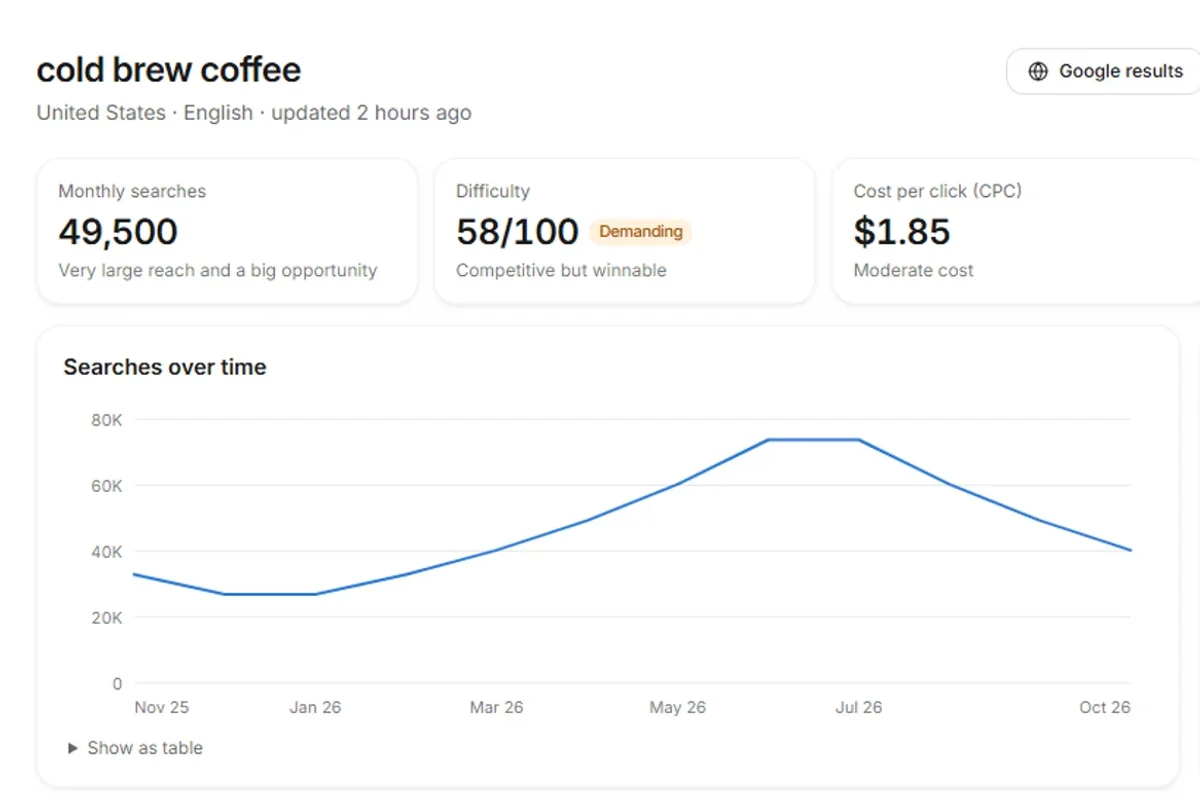
SEO automation is the use of software to run repeatable SEO tasks, such as rank checks, site crawls, reports, keyword clustering and first drafts, on a schedule or through an AI agent, so that people spend their time on decisions instead of data collection.
Most lists of SEO automation tools skip the more useful question: which tasks should you automate at all? Some SEO work is pure data handling and should never take a person's afternoon. Some of it, such as link outreach or publishing, does real damage when it runs without oversight. This guide goes through 13 SEO tasks one by one, with how to automate each and what can go wrong, then explains how AI agents changed SEO automation, lists the tools by category and shows a full workflow on a demo project.
What is SEO automation?
SEO automation means handing repeatable SEO work to software: the tool collects the data, runs the check or prepares the draft, and a person decides what to do with the result. It comes in three levels, and most teams use all three.
- Scheduled tools. A rank tracker checks positions every day, a crawler audits the site every week, a dashboard emails a report every month. Each tool does one job on a timer.
- Rules and workflows. If a page drops more than five positions, create a task. If a new post goes live, check it is in the sitemap and ping IndexNow, or open a task to inspect it in Search Console. You build these in workflow tools such as Zapier, Make or n8n, or in your own scripts.
- AI agents. An agent takes a goal, picks the next task, uses SEO tools to do it and reports back. It handles the cases your rules did not foresee, and a good one asks before it changes anything live.
Which SEO tasks can be automated?
Most SEO tasks that collect, compare or report data can be automated fully, tasks that create content can be automated with a human review, and tasks that build relationships or make strategic choices should stay manual. The table below covers the 13 tasks teams ask about most.
| Task | Automate? | How | Risk |
|---|---|---|---|
| Rank tracking | Yes, fully | Daily checks for your keywords, with alerts for big moves | Low: watch for location and device settings that do not match your audience |
| Reporting | Yes, fully | Scheduled reports or digests from rank, audit and Search Console data | Low: reports nobody reads; send fewer, shorter ones |
| Keyword research and clustering | Yes, with review | Pull volumes and difficulty, group keywords by search intent into topic clusters | Medium: clusters that look neat but mix intents; check the live results |
| Content briefs | Yes, with review | Build outlines from the pages that already rank: headings, terms, questions | Medium: briefs that copy competitors instead of adding something new |
| Drafts | Partly | AI drafts against an approved outline, then a person edits and adds expertise | High: generic text, wrong facts, scaled content abuse if published in bulk |
| Internal links | Yes, with review | Suggest links from an index of your own pages, by topic | Medium: over-linking and irrelevant anchors |
| Meta tags | Yes, with review | Write missing or duplicate titles and descriptions in bulk | Medium: templates that make every title look the same |
| Schema | Yes, with review | Generate structured data (for example Article and FAQ) from the page content | Medium: markup that does not match what the page shows |
| Technical audits | Yes, fully | Scheduled crawls for broken pages, redirects, missing tags and slow pages | Low: long issue lists without priorities |
| Fixing issues | Partly | Agent prepares the fix, a person approves it before it reaches the site | High: a bulk change that breaks templates or redirects |
| Publishing | Only with approval | Schedule approved content, or switch on autopublish for a defined campaign | High: thin or wrong pages live before anyone reads them |
| Link building | Research only | Find prospects and draft personal outreach; never automate mass sending | High: link schemes and spam that Google's policies target |
| Monitoring competitors | Yes, fully | Track competitors' rankings, new pages and keyword gaps | Low: chasing every competitor move instead of your plan |
Automate fully: tracking, reporting, audits, competitors
Rank tracking, reporting, technical audits and competitor monitoring are the safest tasks to automate because they only read data and never change your site. Set them up first. A daily rank tracker, a weekly SEO audit and a monthly report replace hours of manual checking and catch drops before they become trends. The only real risk is noise, so set alert thresholds and keep reports short.
Automate with review: research, briefs, links, meta tags, schema
Keyword research, briefs, internal links, meta tags and schema are worth automating, but each output needs a quick human check before it is used. Software is good at pulling data and producing a structure; it is weaker at noticing that two keywords hide different intents or that a suggested link makes no sense to a reader. In practice, keyword research takes a fraction of the time, and the person's job shifts from collecting data to checking it.
Keep a person in charge: drafts, fixes, publishing, links
Drafts, site fixes, publishing and link building change what people and search engines see, so a person should approve every result. AI can write a solid first draft in an SEO editor, but someone has to add first-hand expertise, check facts and decide whether the page deserves to exist. Fixes and publishing should go through an approval step with a clear record of what changed.
What you should not automate
Do not automate strategy, link outreach, mass publishing or unchecked changes to a live site. These are the places where SEO automation turns from a time saver into a liability.
- Link outreach at scale. Google's spam policies treat link schemes as spam. Automated mass emails asking for links burn your reputation with site owners and can attract a manual action. Automate the prospect research; write the emails yourself.
- Bulk publishing. The same spam policies describe scaled content abuse: many pages generated mainly to manipulate rankings, and the first example given is using generative AI to produce pages without adding value for users. Volume is not a strategy.
- Strategy. Software can rank opportunities by volume and difficulty. It cannot decide which products matter to your business, which markets to enter or when to stop investing in a topic.
- Unreviewed site changes. A bulk rewrite of titles, redirects or templates can undo years of work in a day. Every automated change to a live site needs approval and a way to undo it.
How AI agents changed SEO automation
AI agents moved SEO automation from fixed rules and scripts to software that decides the next step itself, which is why approval became the most important feature. A script does exactly what you wrote; an agent does what it thinks the goal requires, so you need to control what it may do without you.
| Rules and scripts | AI agents with approval | |
|---|---|---|
| Trigger | A schedule or a condition you defined | A goal, a schedule or a change in the data |
| Handles exceptions | No: it breaks or does nothing | Yes: it reads the result and picks another step |
| Output | Data, alerts, a fixed action | Plans, drafts, fixes and reports, ready for review |
| Typical failure | Silent breakage when a page or API changes | Plausible but wrong output, too much volume |
| Control | Whatever you coded | Approval settings: what runs alone and what waits for a click |
| Setup | Hours of building and maintenance | Connect your site and data, set approval rules |
Vendors now compete on how they handle that control. Frase says "nothing ships until you approve it" and lets you set autonomy per content type. Search Atlas OTTO offers an optional approval mode and rollback of changes. Rankability's Serena delivers site changes as GitHub pull requests, with modes from "Ask first" to "Full access". All three checked in October 2026. When you compare tools, ask what runs without a click, where you approve and how you undo a change.
SEO automation tools by category
The best SEO automation tools depend on the task: rank trackers, site auditors, content optimizers, AI SEO agents and workflow builders each automate a different part of the job. The tools below are examples, with facts and prices from vendor pages checked in October 2026, in the currency each page shows. Semurai, our product, comes first in the rows where it appears; the other examples keep their order.
| Category | What it automates | Examples (entry price, checked October 2026) |
|---|---|---|
| Rank trackers | Daily positions, movers, alerts | The rank tracker in Semurai (our product; daily on paid plans, Starter $39 a month with 20 keywords; Free plan with 10 keywords); Nightwatch (Starter €79 a month) |
| Site auditors and fixers | Crawls, issue lists, technical fixes | Search Atlas OTTO (Starter $99 a month); Alli AI (Business $299 a month, or $249 billed yearly, for 5 sites); Rankable (Starter $99 a month, or $49.50 billed yearly) |
| Content optimizers | Briefs, content scores against ranking pages | Surfer (Discovery €49 a month billed yearly, or €59 billed monthly); Frase (Starter $49 a month, or $39 billed yearly) |
| SEO data suites | Keyword, competitor and site data at scale | Semrush (SEO plan from $117.33 a month, $139 billed monthly); Ahrefs (Starter $29 a month; Ahrefs Free) |
| AI SEO agents | Research, drafts, fixes and tracking as one loop | Semurai (our product; Free, Starter $39, Growth $99 a month); Writesonic (from $79 a month billed yearly); Rankability (Starter $97 a month); SEOBot (from $49 a month) |
| Workflow builders | Your own rules across tools | Zapier, Make, n8n: flexible, but you build and maintain every step |
Each category has a clear strength. Semurai covers research, drafts, audits and tracking with approval. Nightwatch is built around rank tracking and adds an SEO agent, NightOwl, whose page lists research, audits, SEO tasks and site changes; its help docs do not describe it editing your site. Search Atlas OTTO and Alli AI push technical changes across sites quickly, which suits agencies (our assessment). Surfer is a content optimizer built for scoring drafts against ranking pages, and Frase covers research to publishing with approval by default. Writesonic pairs content with AI visibility tracking, and SEOBot suits founders who want articles without managing them (our assessment). For a closer comparison of the agents, see our list of the best AI SEO agents in 2026.
An SEO automation workflow in Semurai
Here is a complete SEO automation workflow in Semurai, the product behind this blog, on a demo project for a fictional roastery, Morrowfield Coffee Co. Each step is handled by one of the agents, and anything that reaches the live site waits for a click.
Track rankings
Rankmaru proposes adding keywords to the rank tracker, and you confirm; on paid plans positions are checked daily on desktop or mobile, with a 30-day history. The Free plan tracks 10 keywords, Starter 20, Growth 40 and Pro 80.

Demo project: Morrowfield Coffee Co. (demo data). Keywords go to rank tracking only after you confirm. Audit the site on a schedule
Hime runs the SEO audit with Semurai's own crawler, which scores each page from 100 down and lists the problems behind the Health Score: broken pages, missing or duplicate titles and descriptions, redirects and slow pages. Audits can run on a schedule. On WordPress, Hime prepares fixes for titles, meta descriptions and image alt text, applied only after you approve them.
Research and cluster keywords
Keyres builds a keyword report for "cold brew coffee", groups it into topic clusters and shows the Google results behind each one, while Spynobi compares the site with up to four competitors to find keyword gaps.

Demo project: Morrowfield Coffee Co. (demo data). Keyword clusters, with "cold brew coffee" at the top. Review the outline, then the draft
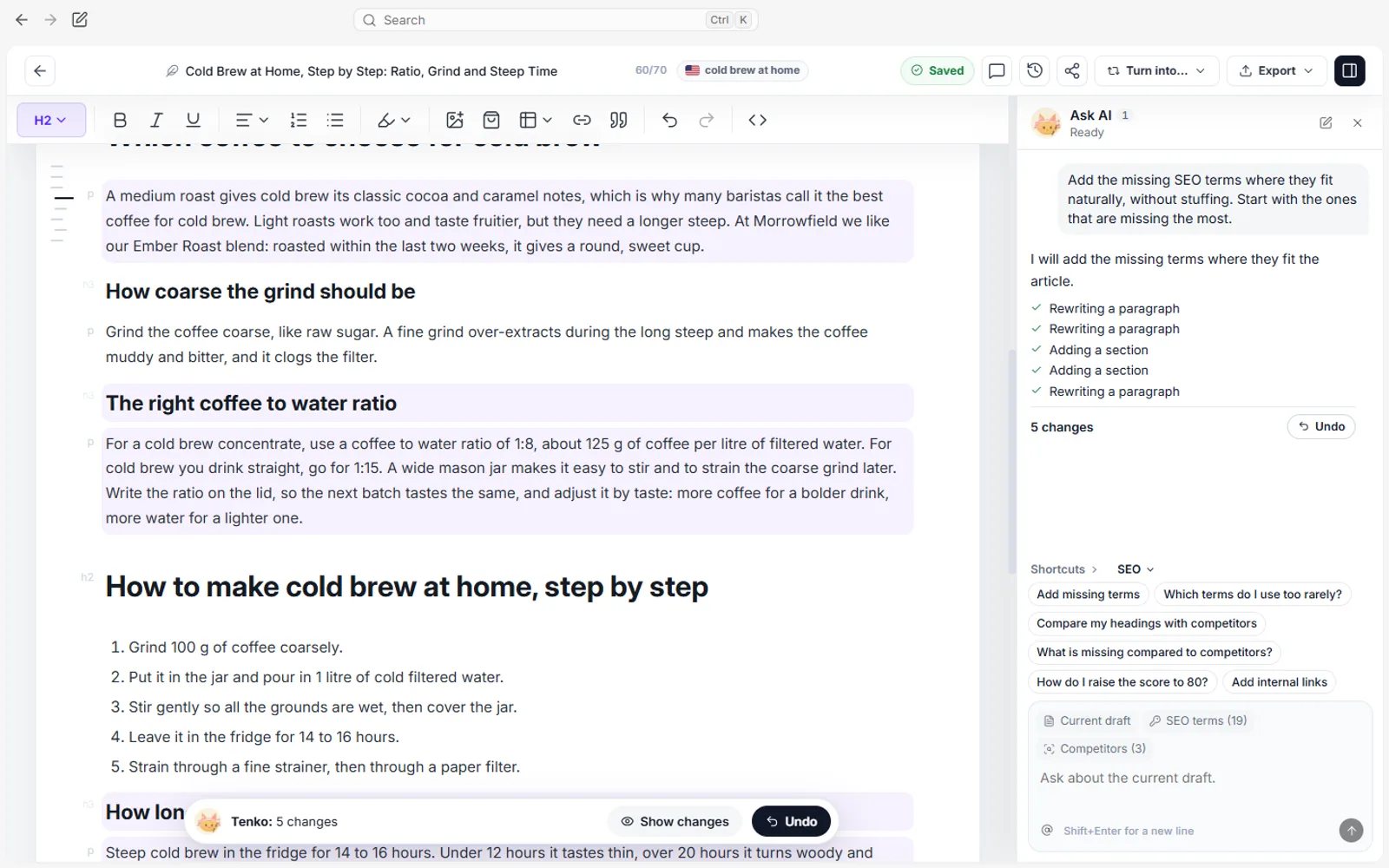
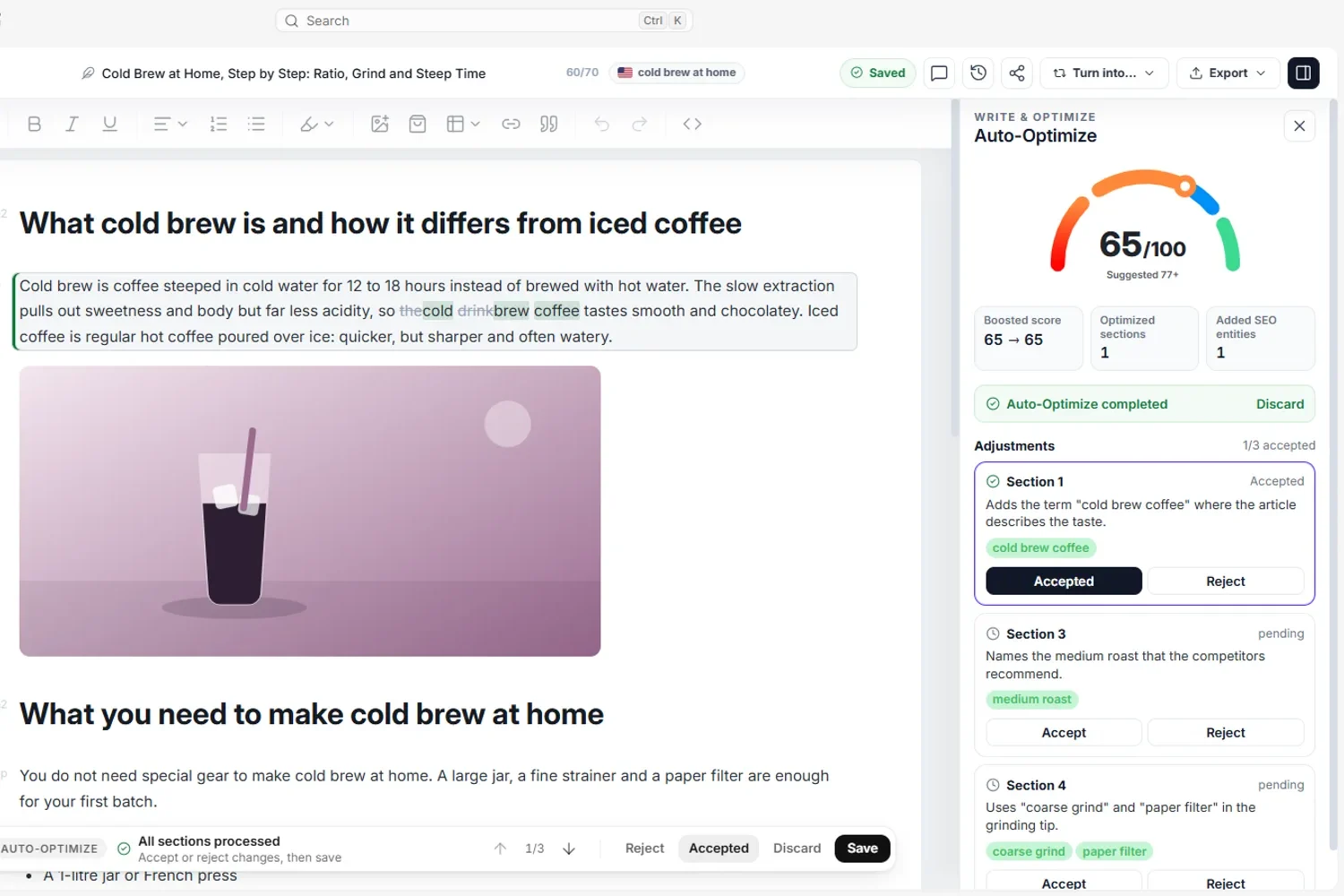
Tenko proposes an outline, which you can approve or edit before the article is written. In the SEO editor, the Content Score compares terms, word count and headings with the pages that rank, and counts your images; internal link suggestions come from your own site, and you can add an FAQ from People Also Ask with BlogPosting and FAQPage structured data to copy or send to WordPress.
Publish when you decide
Publishing to WordPress, Shoper or PrestaShop and scheduling a social publication wait for your click. The one exception: a campaign where you switch on autopublish yourself, for the WordPress site and social channels you choose. Semur collects the agents' proposals on one approval card, where you choose which actions run.
RecordingTranscript
- On the home screen, write your SEO goal
- For example: get the cold brew guide into the top 10
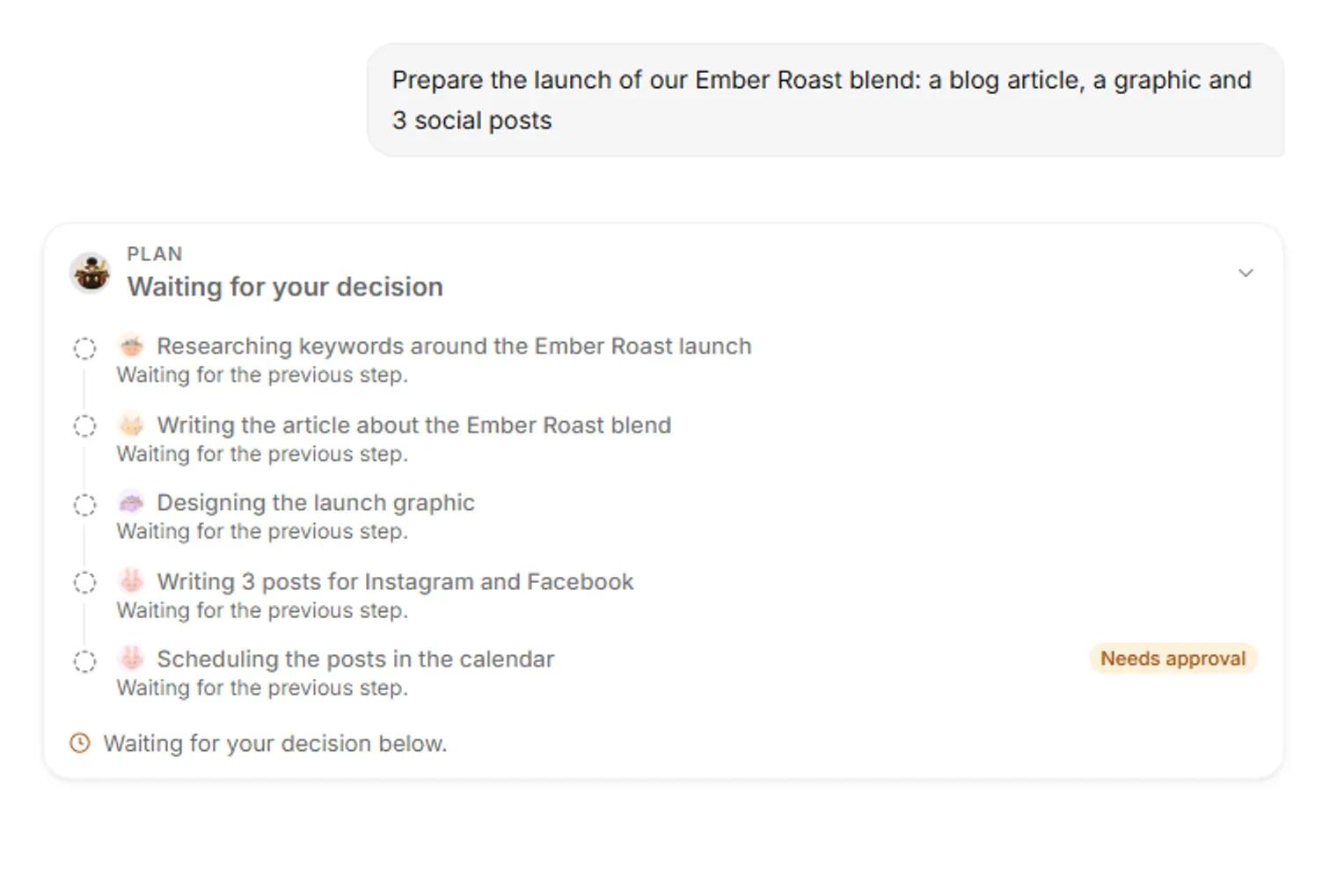
- Semur splits the goal into tasks for Keyres, Tenko, Hime and Rankmaru
- Rank tracking and publishing are marked: they need your approval
- Approve the plan, and the agents start
- Keyres finds the keywords, Tenko writes, Hime audits the page
- Before rank tracking and publishing, Semur asks for your OK
Teams that want more automation can switch on the project autopilot, which is off by default. It can approve a limited set of drafting tasks, such as article outlines, articles and designs, after a veto window you set (12 hours by default, anywhere from 2 to 72 hours), within weekly caps. It never publishes and never changes your store: in the app's words, "publishing on your site and changes in your store always wait for your click."
How to start with SEO automation
Start with the tasks that only read data, then move to tasks that create drafts, and keep publishing behind approval. A sensible order for a small team looks like this.
- Week one: tracking and reporting. Pick the 10-40 keywords that matter, set up daily rank tracking and one short weekly or monthly report.
- Week two: audits. Run a full crawl, fix the worst issues by hand and schedule the next audits.
- Week three: research and briefs. Automate keyword clustering and outlines for your next five pages, and review each one before writing starts.
- Week four: drafts with review. Let AI draft against approved outlines, then edit, add your own expertise and check every fact.
- Always: approval before publishing. Keep a person on the final click, and measure results in the rank tracker before you scale the volume.
SEO automation works best as a division of labour: software does the checking, collecting and first drafting, and people make the calls that need judgment. If you want that split handled by a team of agents, the workflow above shows how it works in Semurai.
Frequently asked questions
Is SEO automation the same as an AI SEO agent?
No. SEO automation is the broader idea: scheduled tools, rules and workflows, and AI agents all run repeatable SEO tasks such as rank tracking, audits, reports and first drafts. An AI SEO agent is one form of it that takes a goal, picks the next task and uses SEO tools to do it. The safest setups keep a person approving anything that changes a live site.
Can SEO run without a person?
Only partly. Rank tracking, reporting, technical audits and competitor monitoring can run on their own because they only read data. Keyword research, content briefs, internal links, meta tags and schema need a human review. Drafts, site fixes and publishing need approval, and link outreach should stay personal.
Is automated SEO safe?
It is safe when automation handles data and drafts and a person approves what goes live. The risks are bulk-published thin content, which Google's spam policies call scaled content abuse, automated link schemes and unreviewed changes that break a site. Use approval steps and keep a record of every change.
Do I need several SEO automation tools?
Usually, because each category automates a different job, unless one platform covers the jobs you need. Rank trackers such as Nightwatch handle positions, Search Atlas OTTO and Alli AI automate technical fixes, Surfer and Frase optimize content, and AI SEO agents such as Writesonic, Rankability, SEOBot and Semurai combine research, drafts and tracking. Workflow builders such as Zapier, Make and n8n connect separate tools with your own rules.
Is it safe to automate link building?
Only the research part. Let software find prospects and draft notes, but keep link outreach personal and never automate mass sending. Google's spam policies treat link schemes as spam, and automated mass emails asking for links burn your reputation with site owners and can attract a manual action.